 Hack the Route Start learning Open app
The idea
IPv4 and IPv6 can't talk to each other, so most machines run both. Find out which one a machine picks, what a Firewall misses, and how a machine with no IPv4 still reaches old websites.
Steps
-
Ask for both addresses
ticketDesk, at Harbor Ferries, has an IPv4 address and an IPv6 address on one network card. That's dual stack: the machine runs both versions side by side.It needs both because the versions can't talk to each other. An IPv6 packet has a different layout, and a machine with only IPv4 can't read it.
The internet couldn't change over in one day, so the plan, written down in 1996, was to give machines both and drop IPv4 later. In June 2026, about half of Google's users reached it over IPv6, so both are still here.
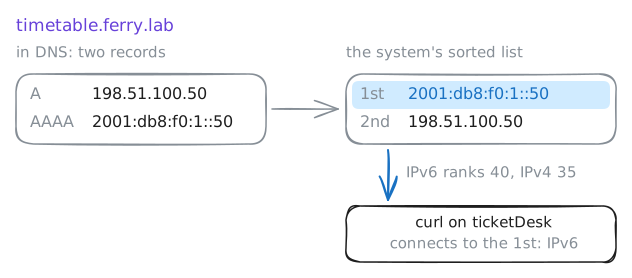
DNS holds the two addresses under one name, in two kinds of record:
Afor IPv4, andAAAAfor IPv6, four As because the address is four times as long.Ask for each record of
timetable.ferry.lab, then fetch the page. It prints the sender it saw.ticketDesk:~# dig +short A timetable.ferry.lab ticketDesk:~# dig +short AAAA timetable.ferry.lab ticketDesk:~# curl -sS -m 3 http://timetable.ferry.lab/
-
Follow each version out
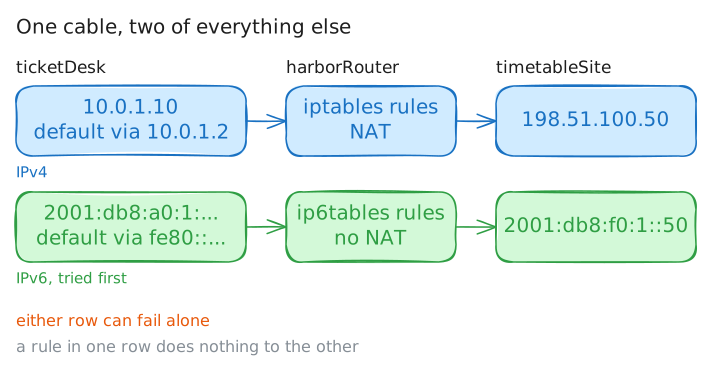
Dual stack shares the card and the cable. Almost everything else comes in pairs. Each version has its own addresses, its own routing table and its own way out through the Router,
harborRouter.ticketDesk's IPv4 address is10.0.1.10, one of the private addresses that can't cross the internet. You've seen what the site shows for IPv6. Now force IPv4 withcurl -4, and see what it shows.Then read both routing tables. Each is a list of where packets go, and
defaultis the line for everything else.ip routelists the table for IPv4, andip -6 routethe table for IPv6.ticketDesk:~# curl -sS -m 3 -4 http://timetable.ferry.lab/ ticketDesk:~# ip route ticketDesk:~# ip -6 route
-
Block the site at the router
A Firewall rule on
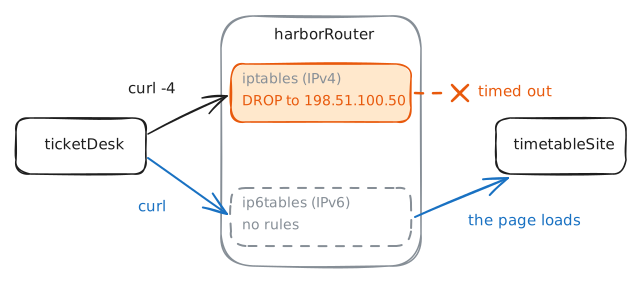
harborRouterdecides which packets it passes on. Say the timetable site has started serving bad downloads, and nobody in the office should open it until the owner cleans it up.The site's address is
198.51.100.50, so add a rule that drops anything going there. On Linux, the classic tool isiptables. ItsFORWARDlist holds the rules for packets passing through a router.Then try the page by name from
ticketDesk, as anyone in the office would, and once more withcurl -4.harborRouter:~# iptables -v -I FORWARD -d 198.51.100.50 -j DROP ticketDesk:~# curl -sS -m 3 http://timetable.ferry.lab/ ticketDesk:~# curl -sS -m 3 -4 http://timetable.ferry.lab/
-
Break one side and watch the fallback
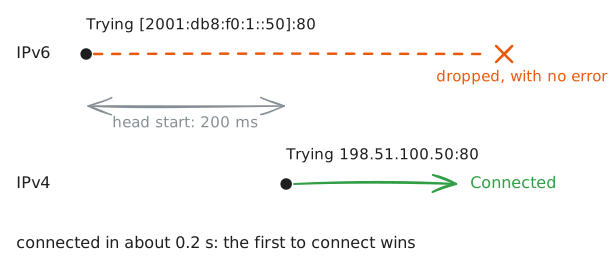
Now the opposite fault: IPv4 works, and IPv6 is broken somewhere along the way. Real networks do this when a router or firewall drops IPv6 and sends no error, so a machine can't know until it tries.
Early on, that was a serious problem. A program tried the IPv6 address, which sorted first, then sat through a time-out of many seconds before it tried IPv4. A small fault in IPv6 made working websites look dead.
The lab has removed your rule and now drops IPv6 packets to the site. Fetch the page with
curl -v, which reports each attempt. Then time it, andpingthe site by name.ticketDesk:~# curl -sS -m 3 -v http://timetable.ferry.lab/ ticketDesk:~# curl -sS -m 3 -w "connected in %{time_connect} s\n" http://timetable.ferry.lab/ ticketDesk:~# ping -c 1 -w 2 timetable.ferry.lab -
Look at a machine with no IPv4
Dual stack gives every machine an IPv4 address too, and the central body that hands out new ones gave out its last in 2011. So some networks give machines IPv6 alone. T-Mobile in the United States had moved to that by 2014.
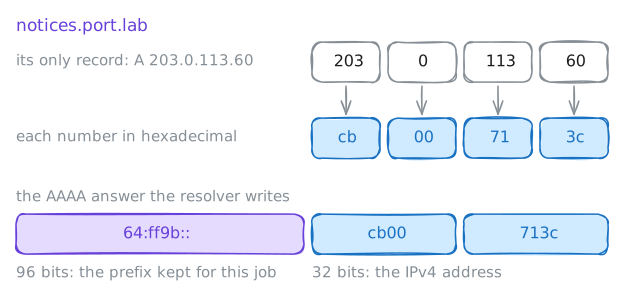
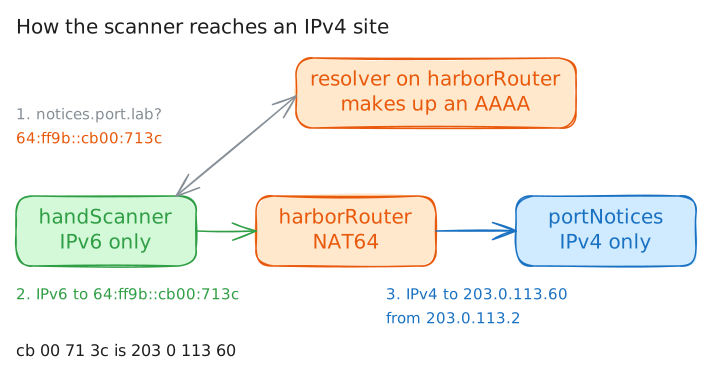
handScanner, on the docks, is IPv6-only. Sites with IPv6 are no trouble for it. Old sites are.notices.port.labis the port's old website, on a server with one IPv4 address and noAAAArecord. The first step said that the versions can't talk, so the scanner shouldn't be able to reach it.Read the scanner's addresses, then ask DNS for both kinds of record. The scanner asks a Recursive resolver on
harborRouter, which is the DNS server that looks names up for this network.handScanner:~# ip addr show dev dockside handScanner:~# dig +short A notices.port.lab handScanner:~# dig +short AAAA notices.port.lab
-
Watch the router translate
harborRoutersends everything for64:ff9b::/96into NAT64, a translator. It reads the IPv4 address from the last 32 bits, rewrites the IPv6 packet as an IPv4 packet, and sends it on.Answers take the same trip backwards. Think of NAT, except that it changes the version as well as the address.
Read the router's route. Then fetch the page from the scanner, while the lab records packets on the scanner's card and on the site's card. Then ping the site's real IPv4 address from the scanner.
harborRouter:~# ip -6 route show 64:ff9b::/96
handScanner:~# curl -sS -m 3 http://notices.port.lab/
handScanner:~# ping -c 1 -w 1 203.0.113.60
Run these steps on real machines