 Hack the Route Start learning Open app
The idea
Hillside School has its own block of IPv6 addresses from its internet provider. Learn to read any address, tell how far it reaches, split the block into networks and see who gives each machine its address.
Steps
-
Spell one address three ways
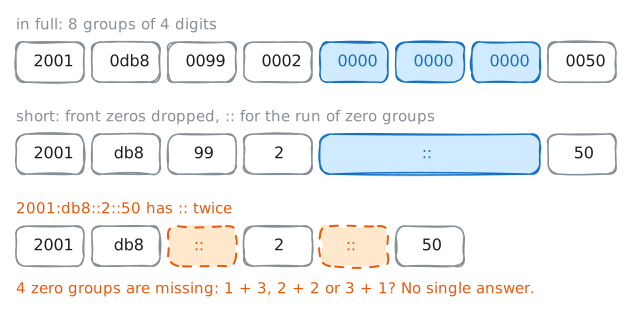
An IPv6 address is 128 bits long. Written in full, it takes 8 groups of 4 hexadecimal digits, which count from 0 to 9 and then from a to f. That gives
2001:0db8:0099:0002:0000:0000:0000:0050, which nobody wants to read out over the phone.Two rules shorten it. First, drop the zeros at the front of any group, so
0db8becomesdb8and0000becomes0. Second, replace one run of all-zero groups with::.The machine knows there must be 8 groups in all, so it can work out how many zero groups
::stands for.Together, they give
2001:db8:99:2::50, the address ofweatherSite, a website outside Hillside School.You're at
teacherDesk, in a classroom. Ping the site with the long spelling, then the short one. Then try a spelling with::in it twice.teacherDesk:~# ping -c 1 -w 1 2001:0db8:0099:0002:0000:0000:0000:0050 teacherDesk:~# ping -c 1 -w 1 2001:db8:99:2::50 teacherDesk:~# ping -c 1 -w 1 2001:db8::2::50
-
Tell how far an address reaches
The first digits of an address say how far it reaches, which saves a lookup when you read a log.
2or3: global. It works across the internet, and the block comes from a provider. Hillside's2001:db8block is set aside for examples, so it stands in for a real one here.fd: unique local. It's private to one organization.fe80: link-local. It works on one link only: the stretch of network with no Router in the way.ff: Multicast. It names a group of machines, not one.::1: loopback. It's this machine talking to itself.
Unique local addresses do the job of IPv4's private addresses.
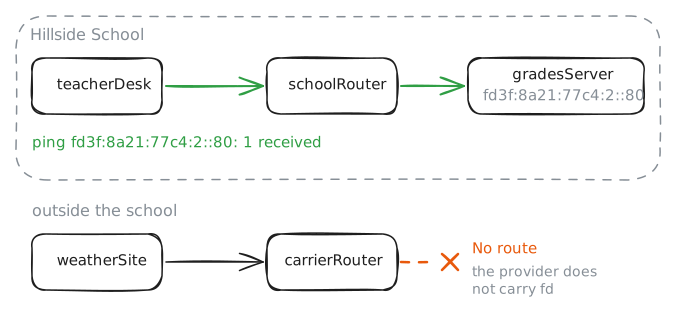
gradesServer, in the staff room, holds pupils' grades and has no business on the internet. So its only address that crosses a router isfd3f:8a21:77c4:2::80.List
teacherDesk's addresses. Then pinggradesServerfromteacherDesk, one router away, and fromweatherSite, outside the school.teacherDesk:~# ip -6 addr teacherDesk:~# ping -c 1 -w 1 fd3f:8a21:77c4:2::80 weatherSite:~# ping -c 1 -w 1 fd3f:8a21:77c4:2::80
-
Split the provider's block
Hillside's provider gave it
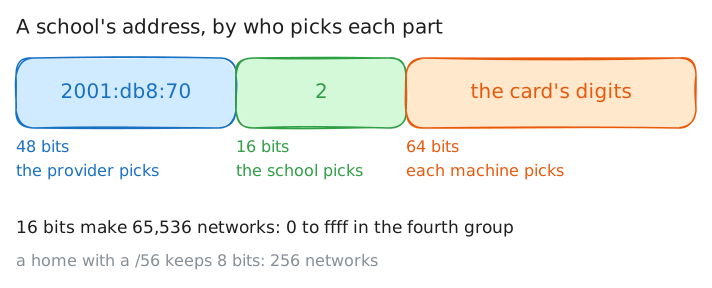
2001:db8:70::/48. The number after the slash says how many bits are fixed, and those fixed bits are the prefix.Each group holds 16, so
/48fixes the first three groups:2001:db8:70. The school chooses everything after them.Networks are normally
/64, so the last four groups belong to the machines. Machines that build their own addresses expect exactly 64 bits to fill. That leaves one group in the middle, the fourth, for the school to number its networks: the classrooms are2001:db8:70:1::/64, and the staff room is2001:db8:70:2::/64.If you've done IPv4 subnetting, notice what's missing. A
/64has room for far more machines than any network will hold, so you never size a network to fit. You number your rooms.The provider doesn't need to know any of this.
carrierRouterkeeps one route for the whole block, and a short prefix fixes few bits, so one route covers every address that shares them.Read
carrierRouter's routes. Then ask which way it would send an address in a network the school hasn't built yet, and one a single digit outside the block.carrierRouter:~# ip -6 route carrierRouter:~# ip -6 route get 2001:db8:70:abcd::1 carrierRouter:~# ip -6 route get 2001:db8:71:2::80
-
See what a website sees
A machine can fill the last 64 bits in several ways.
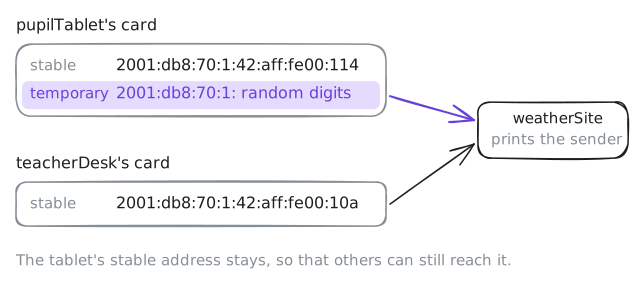
teacherDeskuses the oldest one: its digits come from the MAC address of its network card, the number fixed into the card itself. Its MAC is02:42:0a:00:01:0a, and its digits are42:aff:fe00:10a: the same digits, withff:fepushed into the middle and one bit changed.The MAC doesn't change from network to network, so those digits follow a laptop from home to school to a café, and any website can connect the visits.
Temporary addresses fix that. The machine makes up a second address from random digits, uses it for the connections it opens, and swaps it for a new one after a day or so.
Its stable address stays in place, so that other machines can still reach it. Phones and laptops usually have this turned on.
pupilTablethas temporary addresses, andteacherDeskdoesn't. List the tablet's addresses, then fetch the weather page from each machine. The page prints the sender it saw.pupilTablet:~# ip -6 addr show dev classrooms pupilTablet:~# curl -sS -m 3 http://[2001:db8:99:2::50]/ teacherDesk:~# curl -sS -m 3 http://[2001:db8:99:2::50]/
-
Read what the router orders
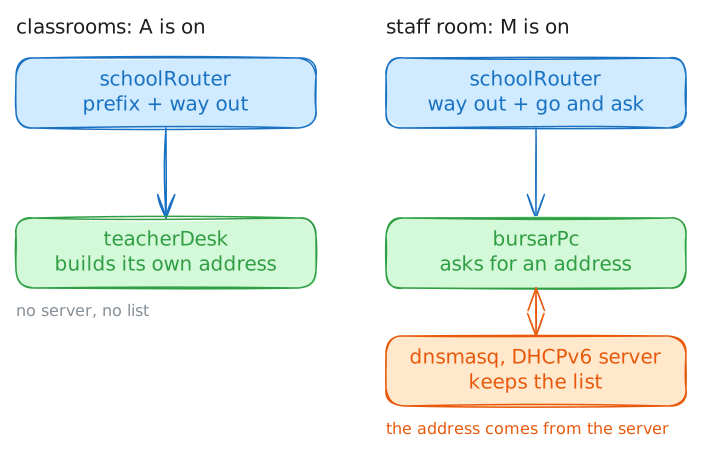
The classroom machines built their own addresses from what the router told them. That's SLAAC, and it keeps no record of who holds what.
Some networks need that record, so they want addresses from a DHCPv6 server, which lends them out and writes them down, as DHCP does on IPv4. The loan is called a lease.
The router decides which method a network uses, and says so in its router advertisement, the message that it sends to every machine on the link. Three flags, each on or off, carry the orders:
Asits on each prefix, and means "build your own address from this".M, for managed, means "get your address from DHCPv6".O, for other, means "get other settings, such as DNS servers, from DHCPv6".
Ask for the advertisement on
teacherDesk, then onbursarPcin the staff room. Then readbursarPc's routes.teacherDesk:~# rdisc6 -1 classrooms bursarPc:~# rdisc6 -1 staffRoom bursarPc:~# ip -6 route
-
Ask a server for an address
The advertisement told
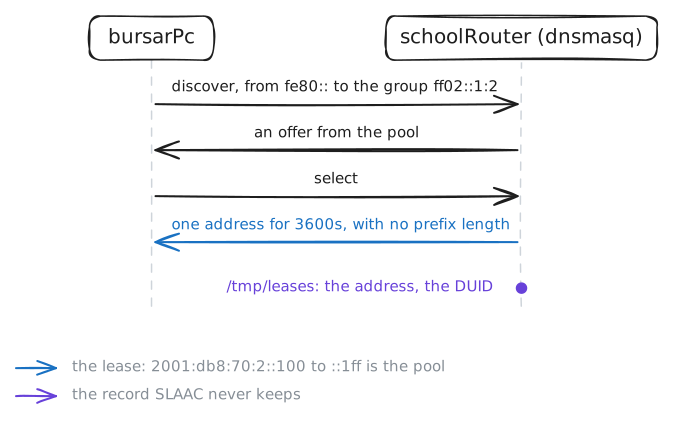
bursarPcto ask, so ask.A client doesn't need to know where the server is. It sends its request from its link-local address to
ff02::1:2, the multicast group of DHCPv6 servers on this link. That's why the card needed a link-local address first.Here the server is dnsmasq, a small program running on
schoolRouter, with the pool2001:db8:70:2::100to2001:db8:70:2::1ffto give out. The client onbursarPcisudhcpc6. It knows a card only by its first name,eth0, the name Linux gave it.Run the client. Then read the address that
bursarPcgot, and the list that the server keeps onschoolRouter, in/tmp/leases.bursarPc:~# udhcpc6 -i eth0 -q -n -s /etc/udhcpc6.script bursarPc:~# ip -6 addr show dev staffRoom schoolRouter:~# cat /tmp/leases
Run these steps on real machines