 Hack the Route Start learning Open app
The idea
Pine Street Library's reading room runs on IPv6, and nobody typed an address into any of its machines. Find out how each one gets its addresses, finds its neighbors and reaches the internet with no NAT in the way.
Steps
-
Read a card's addresses
Every machine on a network needs an address, and the internet has run out of the old kind. An IPv4 address such as
10.0.1.10is 32 bits long, where a bit is a single 0 or 1. That allows about 4.3 billion addresses, and the central pool of them ran out in 2011.IPv6 is the replacement: version 6 of the Internet Protocol, the rules every piece of data follows across the internet. Its addresses are 128 bits long, which allows so many that running out stops being a concern. In June 2026, about half of the people using Google reached it over IPv6.
You're at
frontDesk, a computer in Pine Street Library's reading room. These machines exist only for this lab, so nothing you do here can hurt anything real.Ask
frontDeskwhich IPv6 addresses its network card holds, by typing the command in its terminal, the window where you type commands to a machine. A network card is the part of a machine that connects it to a network, and this lab names each card after its network.frontDesk:~# ip -6 addr show dev readingRoom
-
Call every machine in the room
The
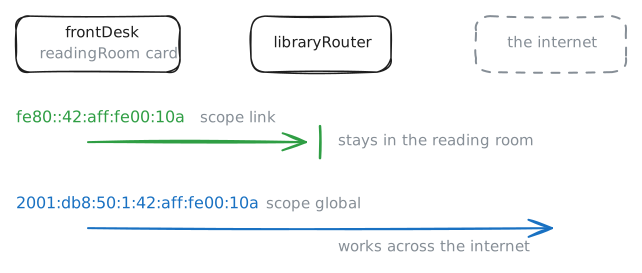
fe80::address is a link-local address. A link is a stretch of network where machines reach each other directly, with no Router in between: here, the reading room. A router is a machine that passes data between networks.Every IPv6 card builds a link-local address for itself the moment it comes up, so machines on a link can talk before anything else works. Routers never pass these addresses on, which is why every network in the world can use the same
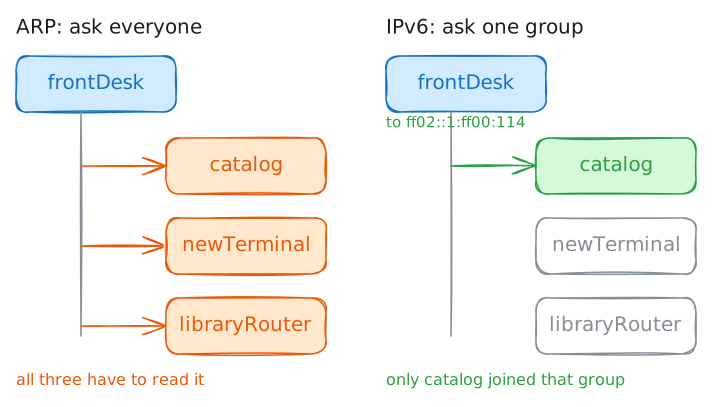
fe80::block with no clash.Next, how do you reach everyone at once? IPv4 has a broadcast address that every machine on a network has to read. IPv6 dropped it, since each broadcast interrupts machines that have no interest in it.
IPv6 uses Multicast instead: an address for a group, which a card joins when it wants that kind of message. A card that never joined drops the data, so its machine never has to read it.
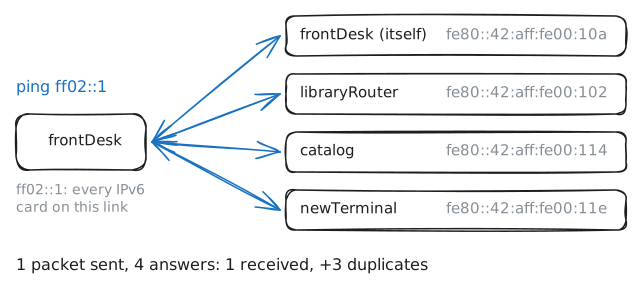
One group holds every IPv6 card from the start:
ff02::1, all the machines on this link.%readingRoomafter the address names the card to send from, because anff02::address means nothing until you pick a link.pingsends a small packet, one chunk of data on a network, and asks for an answer.catalog's link-local address ends in114. After you've called the group, pingcatalog: first with no card name, then with one.frontDesk:~# ping -w 1 ff02::1%readingRoom frontDesk:~# ping -w 1 fe80::42:aff:fe00:114 frontDesk:~# ping -w 1 fe80::42:aff:fe00:114%readingRoom
-
Let a machine build its address
So where did those addresses come from? On IPv4, a new machine usually asks a DHCP server, which hands out an address and keeps a list of who has what. That list is one more machine to run, and one more thing to go wrong.
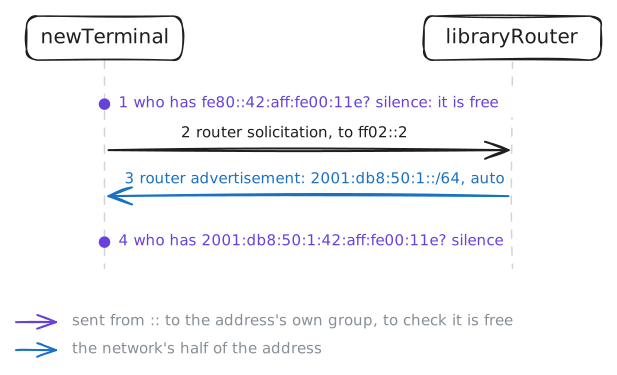
IPv6 was designed so that a machine could set itself up. A router tells the machine the network's half of the address, and the machine makes the other half alone. Nobody keeps a list, so the method is called stateless address autoconfiguration (SLAAC).
Watch it happen on
newTerminal. The lab turns its card off, which wipes its IPv6 addresses.Bring the card up while the lab records at
libraryRouter. Then read the address it ended up with, and the routes it learned.newTerminal:~# ip link set dev readingRoom up newTerminal:~# ip -br addr show dev readingRoom newTerminal:~# ip -6 route
-
Find the MAC inside the address
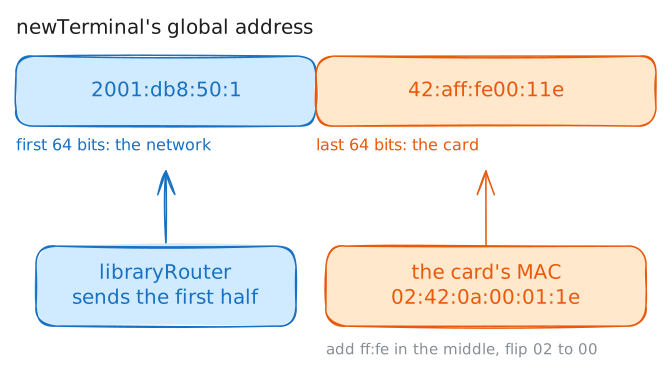
The router supplied the first half of
newTerminal's address. The machine had to invent the second half, and it needed a number that no other card on the link would pick.It already had one. A MAC address is the number fixed into a network card when it's made, and it's meant to be unique in the world. The original SLAAC recipe stretches this 48-bit number to fill the 64 bits on offer:
- Cut the MAC in half and put
ff:fein the middle. - Flip one bit in the first pair of digits, which turns
02into00here, and00into02on a card from a factory.
The result is called a modified EUI-64 identifier. Check the recipe on two real cards:
ip link showprints a card's MAC afterlink/ether. Compare each with the address that ends in the same digits:11efornewTerminaland114forcatalog.newTerminal:~# ip link show dev readingRoom catalog:~# ip link show dev readingRoom
- Cut the MAC in half and put
-
Find a neighbor without ARP
An address alone can't deliver data across a link. Network cards send to each other by MAC address, so before
frontDeskcan reachcatalog, its neighbor on the same link, it has to learncatalog's MAC.On IPv4, ARP does that by asking everyone: a broadcast that says "who has this address?", which every machine on the network has to read. On a network of thousands, that's a lot of machines interrupted for a question meant for one of them.
IPv6 has Neighbor Discovery for this job, and it doesn't ask everyone.
The lab clears
frontDesk's list of neighbors, so that it has to ask. Pingcatalog's global address while the lab records atcatalog. Then read two lists: the neighborsfrontDeskknows now, and the groupscataloghas joined.ip -6 maddronly takes a card's first name, so that one command sayseth0.frontDesk:~# ping -c 1 2001:db8:50:1:42:aff:fe00:114 frontDesk:~# ip -6 neigh show dev readingRoom catalog:~# ip -6 maddr show dev eth0
-
Leave the room with no NAT
Time to leave the room. Data for another network goes to the default gateway,
libraryRouter, and what the router does with it depends on the IP version.On IPv4,
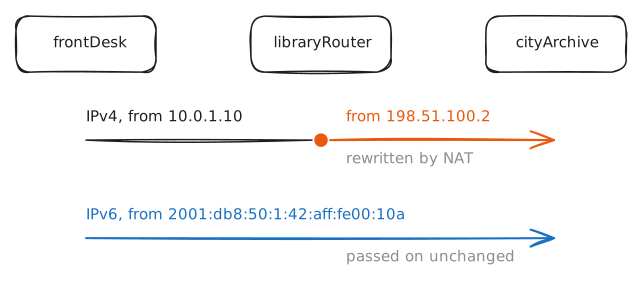
frontDeskis10.0.1.10, a private address that no router on the internet will carry. SolibraryRouterruns NAT: it swaps that sender for its own public address,198.51.100.2, on the way out. NAT arrived in the 1990s as a short-term fix, so that a whole building could share one public address.On IPv6 there's no shortage to work around.
frontDesk's2001:db8:50:1address is public, so the router passes the packet along and leaves the sender as it is.cityArchiveis a website outside the room, and its page prints the sender it saw. Fetch the page both ways. In a web address, an IPv6 address goes inside square brackets, because a colon there normally comes before a port number, as in:8080.Then go to
cityArchiveand pingfrontDeskfrom outside.frontDesk:~# curl -sS -m 3 http://198.51.100.50/ frontDesk:~# curl -sS -m 3 http://[2001:db8:50:2::50]/ cityArchive:~# ping -c 1 -w 1 2001:db8:50:1:42:aff:fe00:10a
-
Stop strangers at the router
That
pingfrom outside should worry you. IfcityArchivecan reachfrontDesk, so can anyone on the internet.NAT was never built as a lock, but it acted like one. A distant stranger had no way to name a machine behind it, so machines inside were out of reach by accident.
IPv6 takes that accident away. A public address means that a machine can be found, and it doesn't have to mean that strangers get through.
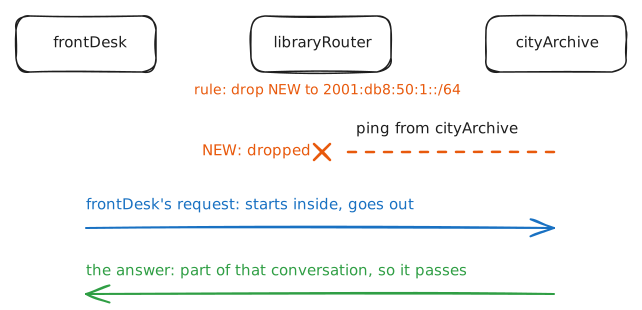
Stopping them is the job of a Firewall, which decides which packets may pass. The usual rule for a home or an office is this: whatever starts inside may go out, and whatever starts outside stops at the router. Many home routers do this for IPv6 out of the box, as RFC 6092 recommends, but it's worth checking yours.
The router has to tell an answer from a stranger. It does that with connection tracking: it keeps a note of each conversation passing through, so it knows which packets belong to one already running.
ip6tablesis Linux's firewall tool for IPv6, and it's separate fromiptables, which handles IPv4 only. Thedual-stacklab shows what happens when someone forgets that.Add the rule on
libraryRouter. Then callfrontDeskfrom outside again, and fetch the page fromfrontDesk.libraryRouter:~# ip6tables -v -A FORWARD -d 2001:db8:50:1::/64 -m conntrack --ctstate NEW -j DROP cityArchive:~# ping -c 1 -w 1 2001:db8:50:1:42:aff:fe00:10a frontDesk:~# curl -sS -m 3 http://[2001:db8:50:2::50]/
Run these steps on real machines