 Hack the Route Start learning Open app
The idea
Every message on the internet carries an address, and it looks like four small numbers. Those numbers tell a machine which network a message belongs to and whether a router has to carry it. Read them the way Mia's machine reads them.
Steps
-
Read an address as one number
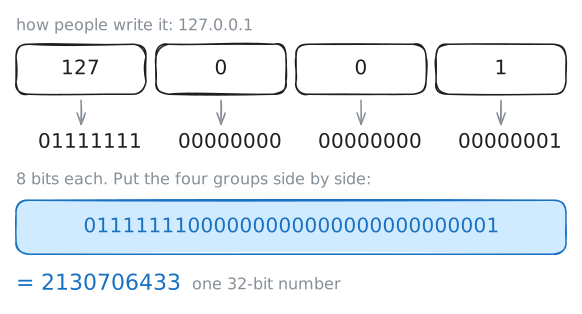
An IP address looks like four numbers with dots, such as
10.0.1.11. Each number is stored in 8 bits, the 0s and 1s a computer keeps. 8 bits can count from 0 to 255, so no part of an address goes higher.Four lots of 8 make 32. So an address is one 32-bit number, and the dots are there for people.
Every machine also has an address for itself,
127.0.0.1. Written as one number, that is2130706433.List the addresses on Mia's machine, then ping the long number.
mia:~# ip -br -4 addr
mia:~# ping -c 1 2130706433
-
Split it into network and machine
Every network card is made with a MAC address. It works like a passport number: it names the card and says nothing about where the card is. A router keeps a table of where to send messages, and if routers worked from MAC addresses, each table would need a row for every card on earth.
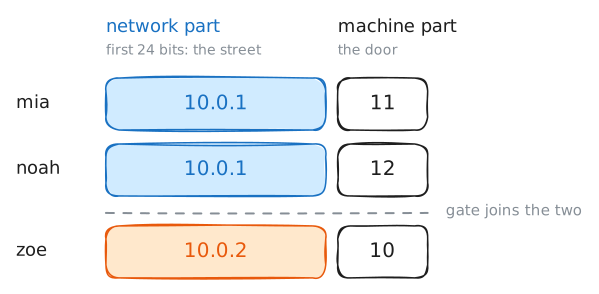
So an IP address is built like a postal address. The first part names the street and the last part names the door, and a postal sorter only needs the way to the street.
The first part is called the network part, and the rest is the machine part. The
/24after an address says where the split falls: the first 24 bits name the network.Three numbers make 24 bits, so
10.0.1.12/24means network10.0.1, machine12. People write that network as10.0.1.0/24.This office has two networks. Mia, Noah and Leo sit on
10.0.1.0/24, Zoe sits on10.0.2.0/24, andgatejoins them. Work out the network of another address,192.168.7.20, under two splits, then readgate's routing table.mia:~# ipcalc -n 192.168.7.20/24 mia:~# ipcalc -n 192.168.7.20/16 gate:~# ip route
-
Watch a machine choose near or far
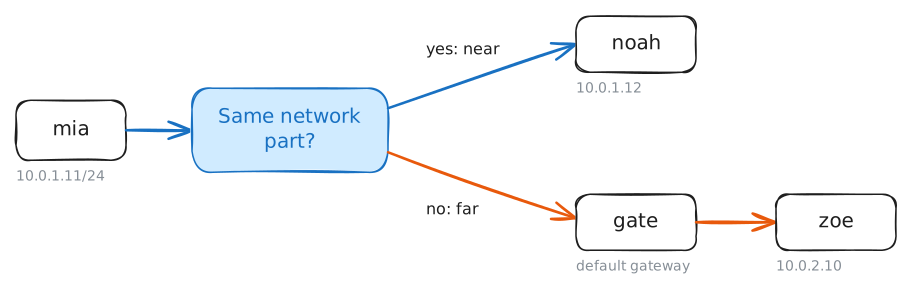
Before a machine sends anything, it makes one decision. It compares the network part of the destination with the network part of its own address.
- If the two are the same, the destination is near, so the message goes straight there.
- If they differ, the destination is far, so the message goes to the default gateway, the router that leads out of this network.
Mia's machine keeps both answers in its routing table, and you will read it first. Then
ip route getasks the table what it would do with one address, without sending anything. Ask it about Zoe's10.0.2.10, and about10.0.1.200, which no machine in this office has.mia:~# ip route mia:~# ip route get 10.0.2.10 mia:~# ip route get 10.0.1.200
-
Put a second address on a card
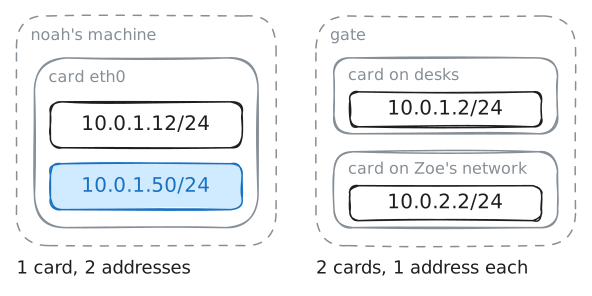
A MAC address comes with the card. An IP address is a setting, and it says where a machine is. So a laptop gets a new one on each network it joins, while its card keeps its MAC address.
An IP address belongs to a card, not to the machine.
gatehas two cards, so it has two addresses. One card can hold several as well, and servers use that to run more than one service, or to pick up the address of a machine that has failed.Give Noah's card a second address, on the desks' network, and list his addresses. Then ping the new one from Mia's machine.
noah:~# ip addr add 10.0.1.50/24 dev eth0
noah:~# ip -br -4 addr
mia:~# ping -c 2 10.0.1.50
-
Find the addresses with a job of their own
Some addresses do a job of their own, so no machine gets them.
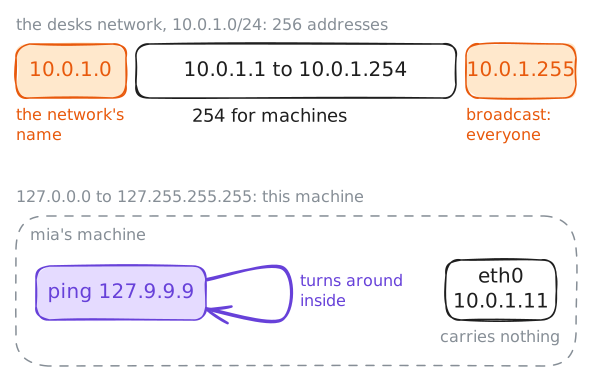
A network like this one gives up two. The first,
10.0.1.0, is the network's own name, and the last,10.0.1.255, is its broadcast address, which reaches everyone on it. So a/24holds 256 addresses and 254 machines.Then there is a whole block. Everything from
127.0.0.0to127.255.255.255means "this machine", about 16 million addresses for one job.It is called loopback, and programs on one machine use it to talk to each other. The name
localhostusually points to127.0.0.1.Mia pings
127.9.9.9, an address nobody gave to anything. Meanwhiletcpdump, a tool that prints what reaches a card, listens on her real card. Then read the table where a machine keeps the addresses it treats as its own.mia:~# ping -c 2 127.9.9.9 mia:~# ip route show table local
Run these steps on real machines