 Hack the Route Start learning Open app
The idea
Alice and Bob each have a machine, and no cable joins them. Alice has a message for Bob and no way to send it. Connect the two machines and get her message across.
Steps
-
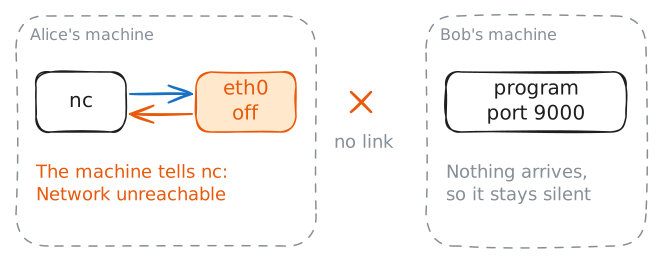
Alice can't reach Bob
Alone, a computer can use only what is stored inside it. Before networks, moving a file to another computer often meant carrying a disk across the room. A network ends that walk: machines send each other messages over a link, such as a cable.
Alice's machine and Bob's machine have no link yet, so see what that looks like. Both belong to the lab, so nothing you run touches your computer.
A command is a line that tells a machine what to do. This one starts with
nc, a program that connects to another machine. Press the arrow to run it.alice:~# nc -v bob 9000
-
Plug in the cable
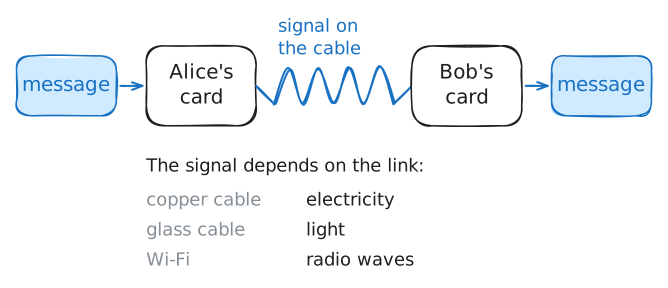
A machine joins a network through its network card, the part a cable plugs into. Your phone has one too, with an antenna in place of the cable.
The card turns each message into a signal, and the card at the far end turns it back into the message. The signal is electricity in a copper cable, light in a glass one, radio waves over Wi-Fi.
Alice's card is called
eth0, and a real machine may use another name, such asenp3s0orwlan0. Bob's card is already on. This lab has no real cables, so a command does the plugging in: it turns Alice's card on.This time you type the command yourself. A typing mistake only shows an error, so try again.
alice:~# ip link set eth0 up
alice:~# ip -br link show eth0
-
Send Bob a message
Alice's machine can reach Bob's now, but a machine runs many programs at once. So a message has to say which program it is for.
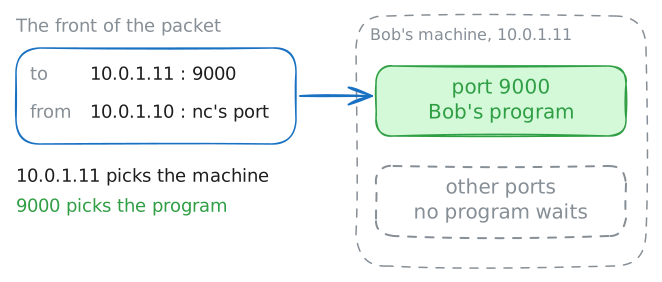
A port is a number that does this. It picks one program on a machine, the way an apartment number picks one door in a building. Bob's program waits on port
9000.The holes that cables plug into on a network box are also called ports, and those are a different thing.
ncfirst asks Bob's machine to open a connection, a conversation between two programs. A link joins two machines, and a connection joins two programs over that link. Thenncsends each line you type.Your line travels as a packet, a small bundle with both machines' addresses and ports on its front. Those take it to the right program and let the answer find its way back.
Press Start, then send your message.
alice:~# nc -v bob 9000
-
Pull the cable mid-conversation
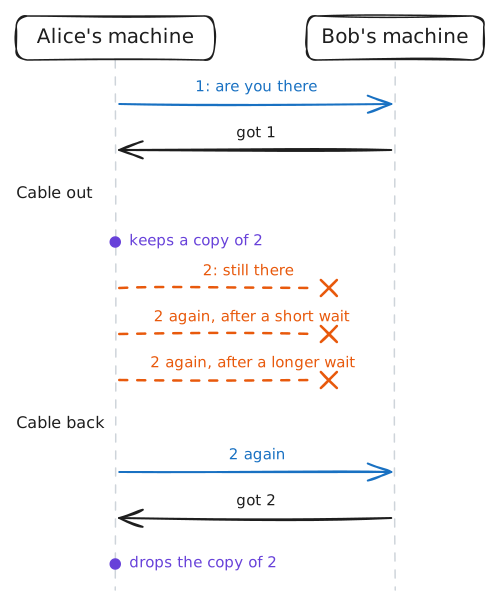
Cables come out, Wi-Fi drops, and a busy machine on the way can throw a packet away. The rules that carry packets across a network promise nothing about any one of them. So a machine cannot assume a message arrived because it left.
You are about to test that on purpose. You will open a new conversation with Bob, pull the cable in the middle of it, and send a message with the cable out.
Make your guess, press Start, then follow the task in the box.
alice:~# nc -v bob 9000
alice:~# ip link set eth0 down
alice:~# ip link set eth0 up
Run these steps on real machines