 Hack the Route Start learning Open app
The idea
Mia, Noah and Leo share an office, and two boxes carry everything they send. People call both of them "the router", and the box at home too, but each one does a different job. Watch each one work, and tell them apart by how much of a message it reads.
Steps
-
Watch a hub repeat every frame
Three machines could each run a cable to the other two, but ten machines would need 45 cables. So offices plug every cable into one box.
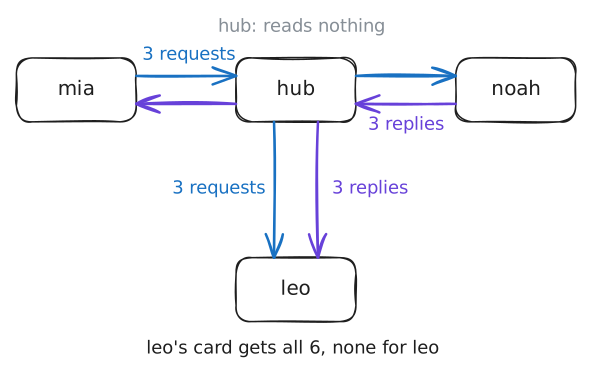
The simplest box of this kind is a hub. A hub reads nothing: whatever comes in on one port, it repeats out of all the others.
A port here is a place on the box where a cable plugs in. The port number from the lab Clients and servers is a different thing that shares the word.
Hubs are nearly gone. So the box here is the kind that replaced them, a switch, set to forget everything, which makes it behave like a hub. The next step turns it back into a switch.
Mia pings Noah: her machine sends 3 small requests, and Noah's machine sends 3 replies. Each one crosses the wire as a frame, the name for a message on one network. The lab listens on Leo's network card, the part of his machine the cable plugs into.
It listens with
tcpdump, which prints what reaches a card, and here it prints only ping frames.mia:~# ping -c 3 noah
-
Give the box a memory
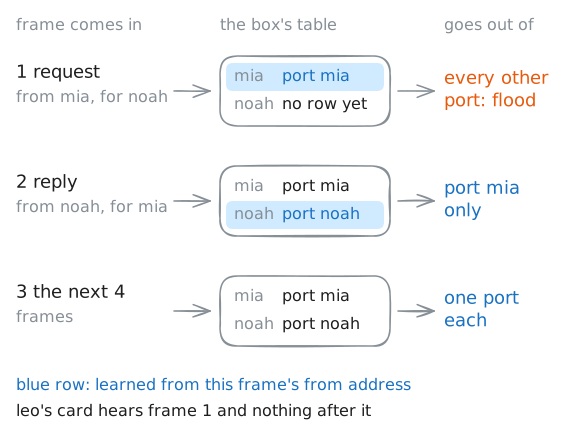
A switch fixes the first fault with one idea: memory. It remembers which machine sits on which port, and sends each frame only there.
To tell machines apart, it uses an address that every card is made with: the card's MAC address, which you will see in a moment as six pairs of characters. Every frame carries two of them, who it is from and who it is for.
When a frame comes in, the switch writes down its from address and the port it came in on. That row in its MAC address table says where that machine sits.
Then it looks up the for address. With a row, the frame goes out of that one port. With none, it goes out of every port except the one it came from, which is called flooding.
Boxes called bridges did this between two cables in the 1980s, and the first switch with many ports went on sale in 1990. Linux still calls the feature a bridge, so the box's switch is named
br0.Turn the memory on.
ageing_timeis how long the box keeps a row, in hundredths of a second, so30000is 5 minutes. Then Mia pings Noah again.box:~# ip link set dev br0 type bridge ageing_time 30000 mia:~# ping -c 3 noah box:~# bridge fdb show br br0 dynamic
-
Cross to another network
A switch joins machines into one network, and there it stops. Picture one giant switch for the whole world: its table would need a row for every machine on earth, and every flood would reach all of them. So the internet is built from many small networks instead, joined by routers.
A router has a card in each network it joins, and it reads deeper than a switch.
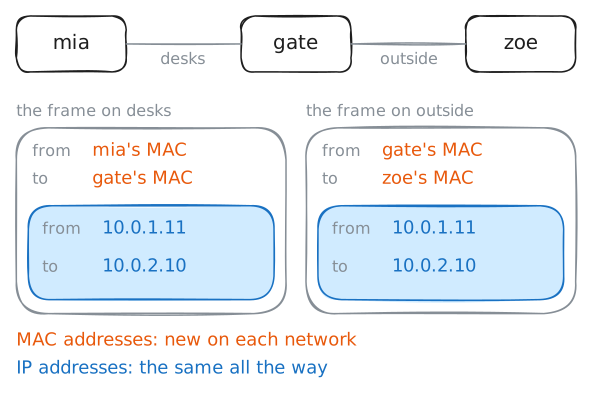
A MAC address only gets a frame across one network. So a router opens the frame and reads the destination IP address inside. That is the
10.0.1.11kind of address from the first step, and it keeps its meaning across networks.Then the router looks that address up in its table, wraps the message in a new frame with new MAC addresses for the next network, and sends it through the right card. The IP addresses stay the same the whole way.
Each message also carries a counter called
ttl, short for time to live. Every router that passes a message on takes 1 off the counter, so thettlthat arrives tells you how many routers the message crossed.Here the router is
gate, and past it, on another network, sits Zoe's server. Listgate's cards and its table, then ping Zoe from Mia's machine.gate:~# ip -br -4 addr gate:~# ip route mia:~# ping -c 3 zoe
-
Stop a broadcast at the router
Sometimes a machine has to ask a whole network, because it doesn't yet know who to ask. A new laptop asks who can give it an address, and a machine asks who owns the address it wants to reach.
A frame sent to everyone like this is a broadcast. The lab DHCP runs the first kind, and the lab MAC and ARP the second.
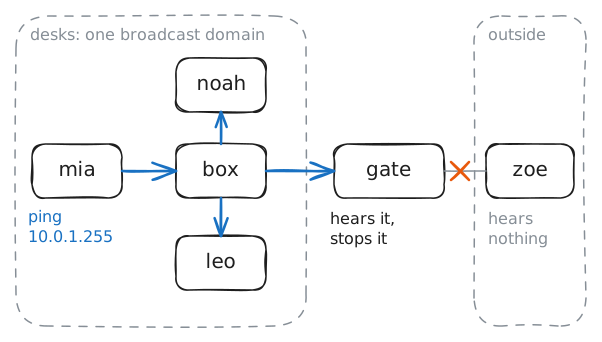
A switch sends a broadcast out of every port, and a router doesn't pass it on. So every machine on a network stops to read each broadcast, and the machines past the router never see it. That is one more reason networks stay small.
Addresses on the desks run from
10.0.1.0to10.0.1.255. The last one is the broadcast address, which means everyone on the desks. Mia pings that address, while the lab listens on Leo's card and on Zoe's card.mia:~# ping -b -c 2 -W 1 10.0.1.255
-
Hit a firewall rule
A router asks one question about a message: where does this go? It never asks whether the message should go at all, and in the small, trusting early internet nobody needed it to. Once strangers shared the same network, people needed a box that could say no.
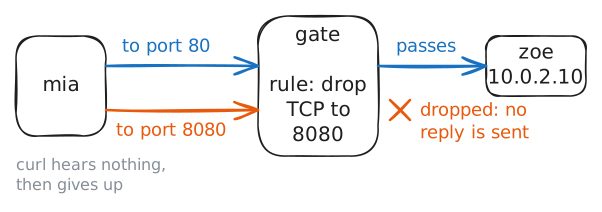
That box is a firewall. A firewall checks each message against a list of rules and decides whether it passes.
To decide, it reads deeper again. Past the IP address it reads the port number, the kind from the lab Clients and servers, so it can tell which program a message is for.
A firewall can be a box of its own, or a rule list on a router. Here it is a rule list on
gate, and the list has one rule: drop TCP connections to port8080. TCP is the kind of connection a web page travels over.Zoe's machine runs a website on port
80and a staff site on port8080. Ask for both from Mia's machine withcurl, a tool that asks a web server for a page. Then read the loggatekeeps of what it dropped.mia:~# curl -sS http://zoe mia:~# curl -sS --max-time 3 http://zoe:8080 gate:~# tail -n 1 /var/log/firewall.log
-
Open the box at home
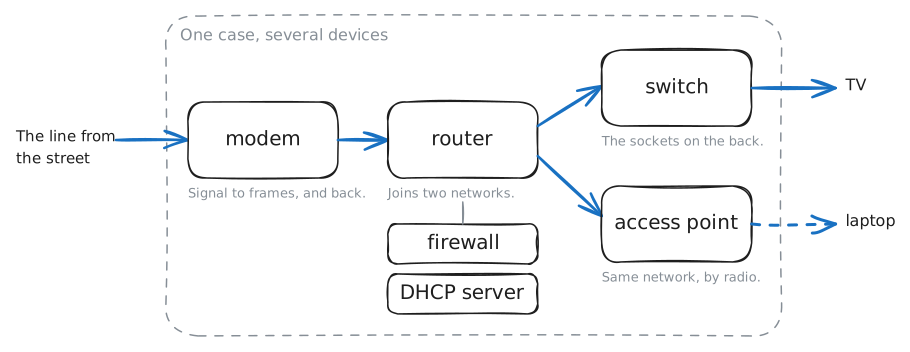
The box your provider gave you gets called a router, a modem and the Wi-Fi, and all three are right. It is several devices in one case.
- A modem changes frames into the signal your line carries, over phone wire, TV cable or fibre, and back. The word comes from modulator-demodulator. On fibre the box is often a separate one called an ONT.
- A router joins your house's network to your provider's.
- A switch sits behind the ports on the back.
- An access point joins radio devices to the wired network, so a laptop on Wi-Fi and a TV on a cable share one network. Its radio devices share the air and take turns, much as machines on a hub do.
- A firewall drops what strangers send in.
- A DHCP server hands each new device an address.
This lab's cables are software with no signal or radio on them, so it can't show a modem or an access point, and it leaves the switch out too. The router, the firewall and the DHCP server are all in
homeBox, the box at Ana's house. Look at her laptop first.ana:~# ip route homeBox:~# ip -br -4 addr homeBox:~# cat /var/lib/misc/dnsmasq.leases
Run these steps on real machines