 Hack the Route Start learning Open app
The idea
A provider's routers would have to remember every customer's addresses, and that list never stops growing. You stick a small number on each packet instead, and end with two customers using the very same addresses across one set of routers.
Steps
-
Lost in the core
You run the network at Longline Telecom, a fiber provider whose cable follows a railway from west to east. Four routers sit along it.
westEdgeandeastEdgeare at the two ends, where customers plug in, and those two are the edge.coreOneandcoreTwoare in between, no customer ever touches them, and those two are the core.Three cables join them:
linkOne,linkTwoandlinkThree, west to east. Each router has a network card on every cable it touches, named after the cable, and in this lab "card" on its own means that kind of card.Two customers pay you. A bank has
bankHqin the west on10.0.1.0/24, andbankBranchin the east on10.0.6.0/24, at10.0.6.10. A radio station hasradioStudioin the west on10.0.2.0/24, andradioMastin the east on10.0.7.0/24.The four cables out to those customers are
bankWest,radioWest,bankEastandradioEast.All four routers run OSPF, so they already know the three cables and each other. Customers' networks are kept out of it, so no router has heard of them unless a customer plugs into it directly.
You'll ping
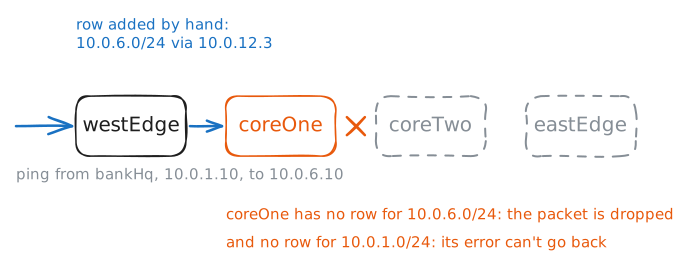
bankBranchfrombankHqtwice. The first try stops atwestEdge, which has no row for10.0.6.0/24in its routing table and says so withDestination Net Unreachable. Then you add that row by hand, sending the packet on tocoreOneat10.0.12.3.bankHq:~# ping -c 2 -W 2 10.0.6.10 westEdge:~# ip route add 10.0.6.0/24 via 10.0.12.3 bankHq:~# ping -c 2 -W 2 10.0.6.10 coreOne:~# ip route
-
Stick a number on
MPLS is the other way out. The first router decides which path a packet belongs to, and writes that on the packet as a small number, the label. Every router after it reads that number and nothing else.
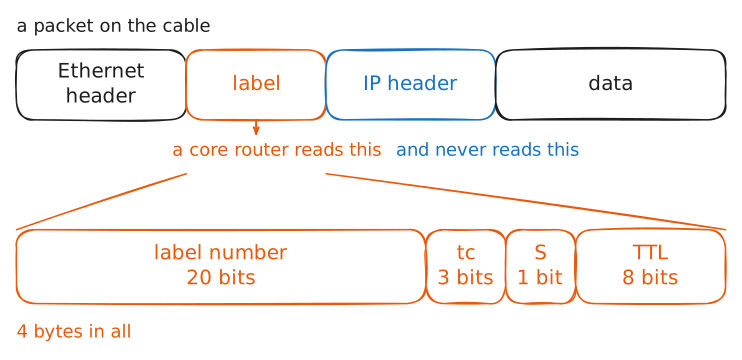
A label is a 4-byte header placed in front of the IP header. A router that does this keeps a second table next to its routing table, and that second table's rows are short: this label came in, send it out with that label, to this neighbour. Looking a row up is an exact match on one number, where a routing table needs the most specific block that contains the address, the one with the longest mask.
That difference was a big selling point in the mid-1990s, when many routers did the longest match in software and it was slow.
Toshiba, Ipsilon, Cisco and IBM all worked on label switching in those years, and an IETF working group formed in 1997 turned the ideas into Multiprotocol Label Switching, published as RFC 3031 in 2001. "Multiprotocol" because the idea works for any protocol under the label.
Then hardware caught up, and the speed argument faded. MPLS stayed for a better reason, which you're about to see.
You build the path from the far end, so that each router is ready before the one upstream starts sending to it.
-f mplstellsip routeto work on the label table instead of the routing table.- On
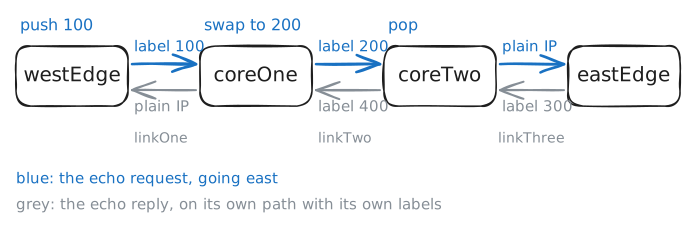
coreTwo,ip -f mpls route add 200 via inet 10.0.34.3means: a packet with label 200 goes toeastEdge. - On
coreOne,ip -f mpls route add 100 as 200 via inet 10.0.23.3means: a packet with label 100 gets label 200 instead, and goes tocoreTwo. - On
westEdge,ip route replace 10.0.6.0/24 encap mpls 100 via 10.0.12.3swaps your plain row for one that puts label 100 on first.
A label works in one direction only, so the way back needs its own path. The lab builds that for you, with labels 300 and 400.
coreTwo:~# ip -f mpls route add 200 via inet 10.0.34.3
coreOne:~# ip -f mpls route add 100 as 200 via inet 10.0.23.3
westEdge:~# ip route replace 10.0.6.0/24 encap mpls 100 via 10.0.12.3
bankHq:~# ping -c 2 -W 2 10.0.6.10
coreOne:~# ip route get 10.0.6.10
coreOne:~# ip -f mpls route
- On
-
Watch the number change
A row says what should happen, so now watch it happen on the cables. You send one
ping, andtcpdump, which can read MPLS, records it onlinkOne,linkTwoandlinkThreeat the same time.Each cable carries the request going east and the reply coming back. The reply is on its own path with its own labels, so read the
echo requestlines first.westEdgeputs label 100 on, so that's whatlinkOneshows, andcoreOne's row turns it into 200 onlinkTwo. The row you gavecoreTwolooks different fromcoreOne's: it has noas, and you gaveeastEdgeno label row at all.bankHq:~# ping -c 1 -W 2 10.0.6.10
-
Lose one row
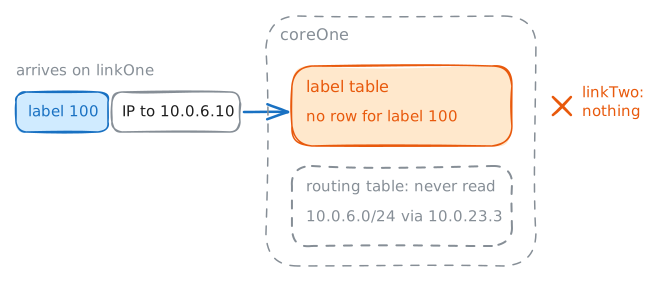
So a core router can forward with no route. What about a core router that has a route and has lost its label row?
That's a real fault. Labels and routes come from different places, so one can be missing while the other is fine.
You'll stage it on
coreOne: add a plain row for10.0.6.0/24towardscoreTwo, then delete the row for label 100. You'll undo all of this afterwards.westEdgedoesn't know about any of this and keeps sending label 100. You record on both ofcoreOne's cables:linkOne, where the packet arrives, andlinkTwo, where it leaves if it goes on.coreOne:~# ip route add 10.0.6.0/24 via 10.0.23.3 coreOne:~# ip -f mpls route del 100 bankHq:~# ping -c 1 -W 2 10.0.6.10 coreOne:~# ip -f mpls route add 100 as 200 via inet 10.0.23.3 bankHq:~# ping -c 2 -W 2 10.0.6.10
-
Let routers pick numbers
You typed three rows, the lab typed three more, and that was one pair of networks. The radio station needs the same, every new customer needs the same, and any cable fault means fixing rows on routers one by one. Nobody runs a network like that.
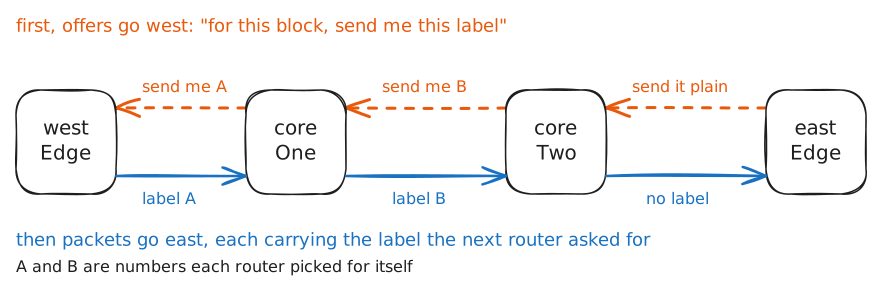
LDP, the Label Distribution Protocol, does this job. It runs beside OSPF and doesn't replace it: OSPF still finds the routes, and LDP goes through this router's own networks and the rows OSPF found, picks a free label for each, and tells every neighbour "for this block, send me this label". A router then installs the label its next hop offered.
Which rows get a label is a vendor's choice, and FRR, the routing software here, leaves rows from BGP alone.
Two LDP routers find each other with a hello, sent to every router on the cable on UDP port 646, then open one TCP connection on port 646 to trade labels. They open it between their
loaddresses, the10.0.90.xyou saw in the routing table.lois a loopback, a card with no cable, so it stays up whichever real card fails, and OSPF has been announcing each router's address on it as a /32.The lab clears your hand-made rows on all four routers, including the customer rows on the edges, and turns LDP on for three of them. You type the fourth, on
coreOne.coreOne:~# vtysh -c "configure terminal" -c "mpls ldp" -c "router-id 10.0.90.2" -c "address-family ipv4" -c "discovery transport-address 10.0.90.2" -c "interface linkOne" -c "exit" -c "interface linkTwo" coreOne:~# vtysh -c "show mpls ldp neighbor" coreOne:~# vtysh -c "show mpls ldp binding" westEdge:~# ip route show 10.0.90.4 bankHq:~# ping -c 2 -W 2 10.0.6.10
-
Customer routes at the edges
Something has to carry customer networks, and it should touch as few routers as possible. Only the two edges ever need them:
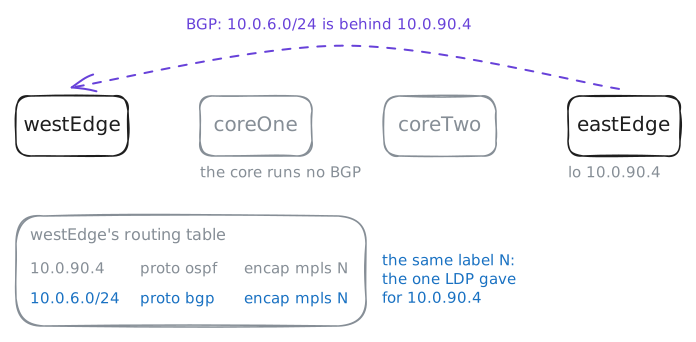
westEdgemust know that10.0.6.0/24lives behindeastEdge, and the core only has to get a packet from one edge to the other.That's a job for BGP. The two edges open one BGP session straight across the core, between their loopback addresses, both in the same autonomous system, 65000.
The core routers carry that session's packets and don't run BGP. Each edge announces its customer networks, naming itself as the next hop,
10.0.90.1or10.0.90.4.You open
westEdge's end.update-source losends from the loopback address, because that's the addresseastEdgeexpects, and the lab openseastEdge's end for you.westEdgeholds no LDP label for10.0.6.0/24, since that offer stopped atcoreTwo, and all it gets from BGP is "that block's next hop is10.0.90.4".westEdge:~# vtysh -c "configure terminal" -c "router bgp 65000" -c "neighbor 10.0.90.4 remote-as 65000" -c "neighbor 10.0.90.4 update-source lo" -c "address-family ipv4 unicast" -c "network 10.0.1.0/24" -c "network 10.0.2.0/24" westEdge:~# ip route show 10.0.6.0/24 coreOne:~# ip route bankHq:~# ping -c 2 -W 2 10.0.6.10 radioStudio:~# ping -c 2 -W 2 10.0.6.10
-
Two labels, two customers
That last
pingis a problem. One routing table on each edge means every customer can reach every other, and the bank has noticed.The radio station has a second request: it has bought a transmitter company whose machines use
10.0.6.0/24, the same block as the bank's, and it isn't renumbering them. So the lab movesradioMastto10.0.6.10, the very addressbankBranchhas.This is what providers sell as an MPLS VPN. Each edge gets one VRF per customer, a separate routing table, the same split as in the
vrf-routerslab. A customer's card joins that customer's table, sobankandradiocan hold the same block without a clash.BGP then has to carry two routes for
10.0.6.0/24without mixing them, so it gets three additions:- A route distinguisher is a tag glued to the front of the block, so
65000:1:10.0.6.0/24and65000:2:10.0.6.0/24are two different things to BGP. - A route target says which VRFs may import a route. The bank's rows are stamped
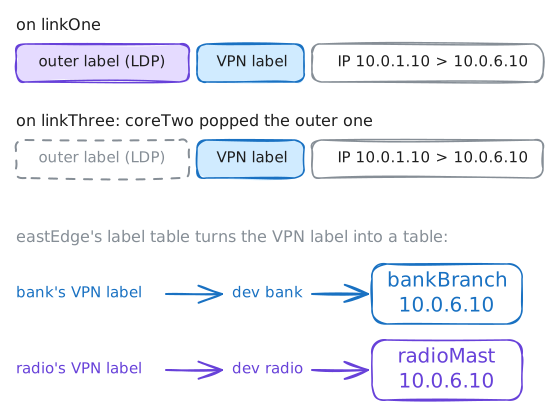
65000:1, and only thebanktable takes them in. - A VPN label is one more label, picked by the far edge, that says what to do with the packet. FRR gives each VRF one label here, so it means "this packet belongs in that VRF".
The lab uses one number for both tags,
65000:1for the bank and65000:2for the radio station, which is common, though the two do different jobs.So the lab sets all of that up, and you turn it on with one command on
westEdge:address-family ipv4 vpnsays this session also carries VPN routes.A packet now leaves
westEdgewith two labels stacked. The inner one is the VPN label, and the outer one is LDP's, which gets the packet to the far edge exactly as before. Core routers read only the outer label, the top one.westEdge:~# vtysh -c "configure terminal" -c "router bgp 65000" -c "address-family ipv4 vpn" -c "neighbor 10.0.90.4 activate" westEdge:~# vtysh -c "show bgp ipv4 vpn" westEdge:~# ip route show vrf bank westEdge:~# ip route show vrf radio bankHq:~# curl -sS -m 3 http://10.0.6.10/ radioStudio:~# curl -sS -m 3 http://10.0.6.10/ bankHq:~# ping -c 1 -W 2 10.0.6.10 eastEdge:~# ip -f mpls route
- A route distinguisher is a tag glued to the front of the block, so
Run these steps on real machines