 Hack the Route Start learning Open app
The idea
A branch with two lines to head office usually keeps one idle as a spare. SD-WAN, the software-defined WAN, puts both to work: each application rides the line that suits it, and the routers move it by themselves when that line starts losing packets.
Steps
-
One line for everything
You run the network at Kestrel Ferries. Its quay ticket office works with head office in the city:
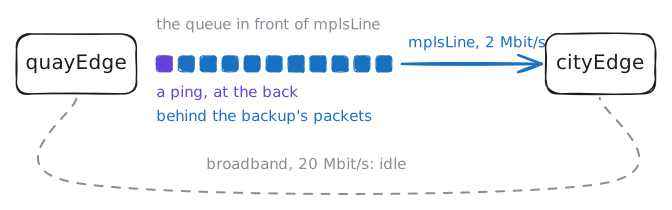
quayDesksells tickets and takes phone calls, andquayCamerassends the day's camera footage tohqServerevery evening.quayEdgeis the quay office's router, andcityEdgeis head office's. Two lines join them.mplsLineis a private line rented from a provider that runs MPLS. It's steady, about 20 ms there and back, but carries only 2 Mbit/s and costs a lot.broadbandis an ordinary internet line fromquayEdgetointernetRouter, the internet provider's router. It carries ten times as much for a fraction of the price, but its times are longer and uneven, with no promises. Head office has its own internet line,cityLine, to the same router.
Today every packet takes
mplsLine, andbroadbandsits idle. You'll readquayEdge's routing table, pinghqServerat10.0.4.10fromquayDesk, then start the camera backup and ping again during it.quayEdge:~# ip route quayDesk:~# ping -c 3 10.0.4.10 quayCameras:~# iperf3 -c 10.0.4.10 -p 5201 -t 12 quayDesk:~# ping -c 6 10.0.4.10
-
A tunnel over broadband
Before anything can use
broadband, it has to reach head office. In this lab the addresses onbroadband,cityLineandcloudplay the internet's public addresses.The internet carries public addresses only, so
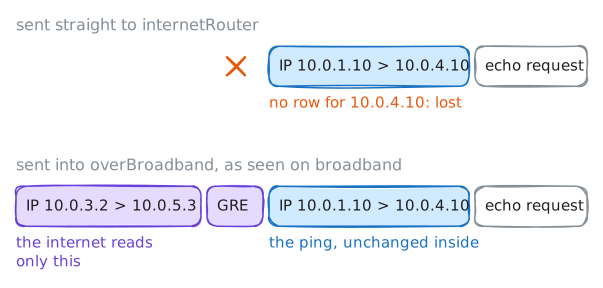
internetRouterhas no row for10.0.4.0/24or10.0.1.0/24. You try anyway first: you givequayEdgea row forhqServeralone,10.0.4.10/32, pointing atinternetRouter,10.0.3.3, and ping. The most specific row wins, so onlyhqServermoves.Then you give each packet a second, outer header, from
quayEdge'sbroadbandaddress,10.0.3.2, tocityEdge'scityLineaddress,10.0.5.3. Both are public addresses, so the internet can deliver it, andcityEdgetakes the outer header off. That's a GRE tunnel, and to the router it looks like one more card, which you'll calloverBroadband.The lab builds the far end on
cityEdge, and gives the ends addresses to reach each other by,172.16.0.1and172.16.0.2. Then you sendhqServer's row into the tunnel, and recordbroadbandwhile you ping.quayEdge:~# ip route replace 10.0.4.10/32 via 10.0.3.3 quayDesk:~# ping -c 2 -W 2 10.0.4.10 quayEdge:~# ip link add overBroadband type gre local 10.0.3.2 remote 10.0.5.3 ttl 64 quayEdge:~# ip route replace 10.0.4.10/32 dev overBroadband quayDesk:~# ping -c 2 -W 2 10.0.4.10
-
Send each application its way
Now everything for
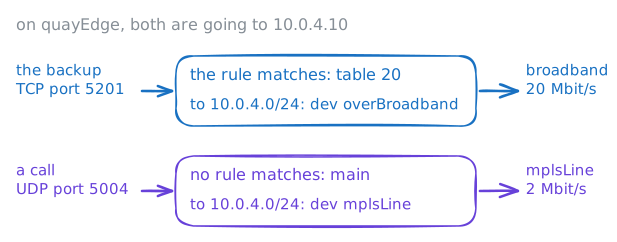
hqServertakesbroadband, and that's no better. The calls wantmplsLine, short and steady, and the backup wantsbroadband's room. Both go to10.0.4.10, and a routing table picks a row by destination alone.A Linux router can hold many routing tables: the one
ip routeprinted is calledmain, and others have numbers. Above them sitsip rule, a list checked in order before any table is read. A rule can match the protocol and the port too, and send the packet to another table.The lab took your
hqServerrow away and wrote table 20, with one row:10.0.4.0/24into the tunnel. It did the same oncityEdge, plus a rule for the backup's replies, from port 5201: each router picks the way out for its own packets, so without it they'd come home onmplsLine.The backup uses TCP port 5201, and the calls use UDP port 5004. You add the backup's rule, ask
quayEdgewhich way each would go, then rerun the backup and ping during it.quayEdge:~# ip rule add ipproto tcp dport 5201 lookup 20 quayEdge:~# ip rule quayEdge:~# ip route get 10.0.4.10 ipproto tcp dport 5201 quayEdge:~# ip route get 10.0.4.10 ipproto udp dport 5004 quayCameras:~# iperf3 -c 10.0.4.10 -p 5201 -t 12 quayDesk:~# ping -c 6 10.0.4.10
-
Hand the rules to a controller
Two rules on two routers suit one office. Kestrel Ferries has an office at every port it sails to, and each change would mean getting every rule right on every router.
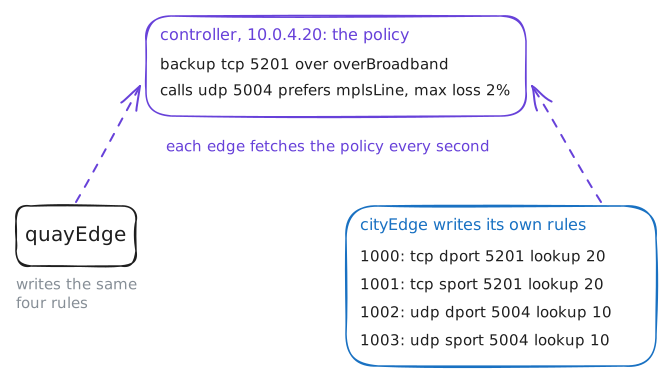
SD-WAN keeps the decisions in one place. A controller, here
controllerat10.0.4.20, holds one policy: each application, and the path it should take. A program on every edge, the router at each end, fetches the policy every second and writes the rules itself.Here that program is
sdwan, written for this lab and running on both edges since the start, andcontrollerruns it too, to keep the policy. Commercial products hold an encrypted session the controller pushes changes down, and this one polls plain HTTP to stay short.Each edge has two paths to the other:
mplsLine, andoverBroadband, the tunnel. Once the policy names an application, each edge sends probes through both, five pings a second to the far edge, andsdwan pathssums up the last 25.The lab took away the last step's rules. On
controlleryou add the backup, then the calls, which leavemplsLineif it loses more than 2% of the probes.controller:~# sdwan add backup tcp 5201 --prefer overBroadband controller:~# sdwan add calls udp 5004 --prefer mplsLine --max-loss 2 cityEdge:~# ip rule quayEdge:~# sdwan paths
-
A line that loses packets
Lines rarely die outright. More often one stays up and starts losing packets, a brownout: a fault at the provider, a damp cable joint, a busy link you can't see.
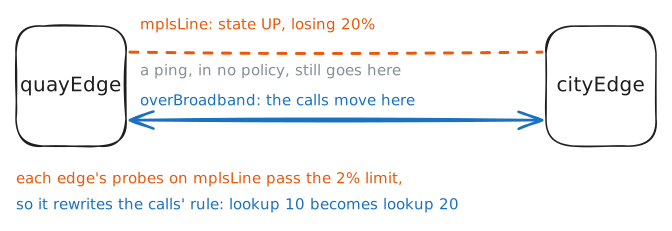
OSPF and the other routing protocols notice a line that dies. With their usual timers they go on using one that loses a packet in five, since enough of their own messages get through, and tuned to react faster they'd drop it and bring it back every minute or so. A call breaks up long before that: a few lost packets in a hundred are already audible.
The lab now makes
mplsLinedrop 20% of the packets each edge sends on it, and you check the card is still up. Then you read what the programs did, make a test call withiperf3, and pinghqServeronce more.quayEdge:~# ip link show mplsLine quayEdge:~# sdwan log quayEdge:~# ip rule quayDesk:~# iperf3 -c 10.0.4.10 -u -p 5004 -b 64k -l 160 -t 4 quayDesk:~# ping -c 20 -i 0.2 10.0.4.10 quayEdge:~# sdwan log
-
Break out to the cloud
Before each sailing,
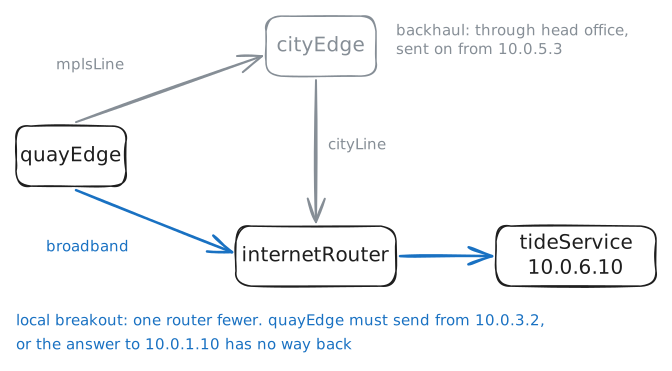
quayDeskcheckstideServiceat10.0.6.10, a tide-table service on the internet. Today that request ridesmplsLineto head office, andcityEdgesends it out oncityLinebehind NAT: it swaps the private sender address for its own public one,10.0.5.3. The lab set that NAT up, as head office has always had it.That trip through head office is called backhaul. It spends the expensive line on traffic that never needed head office, though on the way it passes head office's firewall, which this lab leaves out. Sending it from the quay straight to the internet is local breakout.
You trace the way the request goes today with traceroute, add a row on
quayEdgesending10.0.6.0/24tointernetRouter, and fetch the page.quayDesk:~# traceroute -n 10.0.6.10 quayEdge:~# ip route add 10.0.6.0/24 via 10.0.3.3 quayDesk:~# curl -sS -m 3 http://10.0.6.10/ quayEdge:~# iptables -t nat -A POSTROUTING -o broadband -j MASQUERADE quayDesk:~# curl -sS -m 3 http://10.0.6.10/ quayDesk:~# traceroute -n 10.0.6.10
Run these steps on real machines
Keep reading
- SD-WAN, Wikipedia article
- What is SD-WAN? Fortinet article
- Fundamentals of SD-WAN, Kevin Wallace Training video