 Hack the Route Start learning Open app
The idea
Your game studio has its own block of addresses, and no network on earth knows how to reach it. BGP is how one network tells the next, so open a session by hand and announce the block, then find out how little anyone checks.
Steps
-
Open the first session
Night Harbor is the game your studio runs.
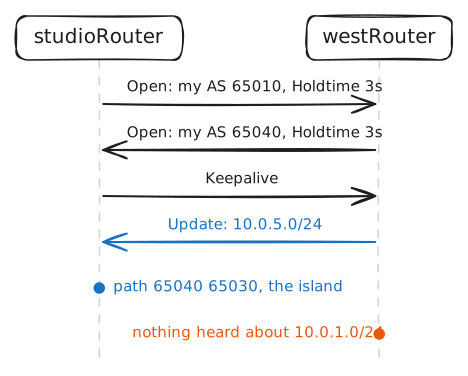
gameServersits on your network,10.0.1.0/24, behindstudioRouter, and your players sit on a far-off island, behindislandRouter. You've signed with a provider, a company paid to move traffic between networks, and the cable fromstudioRouterto the provider'swestRouteris plugged in.playerstill can't reach you, because no router outside your building has heard of10.0.1.0/24. The usual fixes don't work here. Typing a static route into every router on earth is out of the question, and OSPF needs every router to share one map, which works when one company owns them all.The internet is about 80,000 separate organizations, and none of them will hand a rival its map or let a stranger steer its traffic. Each one runs an autonomous system, or AS: a network under one management, known to the world by a number. BGP, the Border Gateway Protocol, is how they talk to each other.
Kirk Lougheed of Cisco and Yakov Rekhter of IBM sketched BGP on napkins over lunch at an engineering conference in 1989, and the internet has run on it ever since. Its design follows from that distrust. Neighbors share no map, only an answer to one question, which blocks of addresses can be reached through you, and each network then decides for itself what to believe.
Neighbors don't find each other either. A BGP session is set up by hand at both ends, like a contract, and each end names the address and the AS number it expects at the other.
The provider has done its half and sent you the details:
westRouteris10.0.12.3, and the provider is AS 65040. Your studio is AS 65010, and the island's network is AS 65030. Real numbers come from an address registry, and this lab uses the range set aside for private use.The session runs over TCP on port 179. TCP delivers every message in order or drops the connection, so BGP says each thing once, where RIP repeats its whole list every 30 seconds.
Look at the provider's end first, then type your half. The lab records the session's packets on
fiberLinkfor a few seconds as you do.westRouter:~# vtysh -c "show ip bgp summary" studioRouter:~# vtysh -c "configure terminal" -c "router bgp 65010" -c "neighbor 10.0.12.3 remote-as 65040" studioRouter:~# vtysh -c "show ip bgp summary" player:~# curl -sS -m 3 http://10.0.1.10/
-
Announce your block
Telling the world takes one setting.
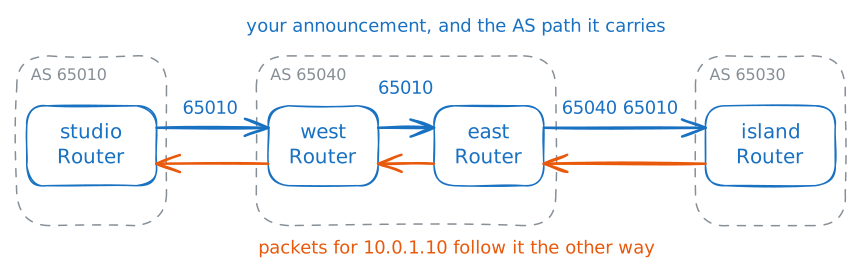
network 10.0.1.0/24tells BGP to announce that block to every neighbor, which means: traffic for these addresses can come through me. FRR sends it only if the router already holds a route to exactly that block, and yours does, becausestudioNetis plugged into it.The announcement leaves as an Update message, and it carries the AS path, a list of the networks it has crossed, starting with yours. Each network that passes it on to another network adds its own number to the front. The list has two jobs: a router with two paths to one block prefers the shorter list, and the list stops loops.
Here's the second job at work. FRR offers a neighbor everything it knows, so
studioRouterhas already offered the island's block back to the provider, with65010added to the front of the path. It's the secondUpdate Messagewith10.0.5.0/24in the last step's recording, as65010 65040 65030.studioRouter:~# vtysh -c "configure terminal" -c "router bgp 65010" -c "address-family ipv4 unicast" -c "network 10.0.1.0/24" islandRouter:~# vtysh -c "show ip bgp" studioRouter:~# vtysh -c "show ip bgp neighbors 10.0.12.3 advertised-routes" westRouter:~# vtysh -c "show ip bgp summary" player:~# curl -sS -m 3 http://10.0.1.10/
-
Add a spare link
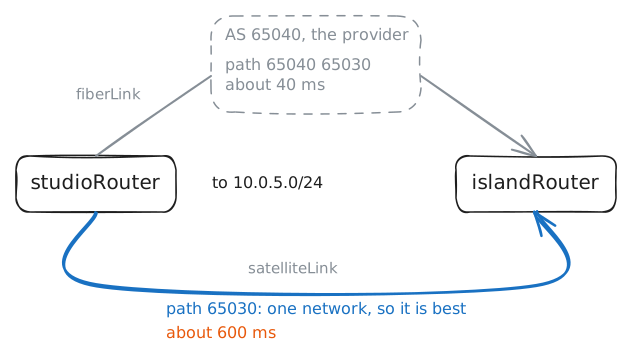
One cable is one digger away from an outage, so the studio buys a second way out: the island's network sells a satellite link that runs from
studioRouterstraight toislandRouter. Having more than one way out to the internet is called multihoming, and you're buying this one as a spare. A geostationary satellite sits so far up that a round trip takes about 600 ms, which is fine in an emergency and awful in a game.The island's end is ready, at
10.0.15.3. Measure the fiber first, then open the second session the same way you opened the first, and measure again.gameServer:~# ping -c 3 -W 2 10.0.5.10 studioRouter:~# vtysh -c "configure terminal" -c "router bgp 65010" -c "neighbor 10.0.15.3 remote-as 65030" studioRouter:~# vtysh -c "show ip bgp 10.0.5.0/24" gameServer:~# ping -c 3 -W 2 10.0.5.10
-
Lose the link silently
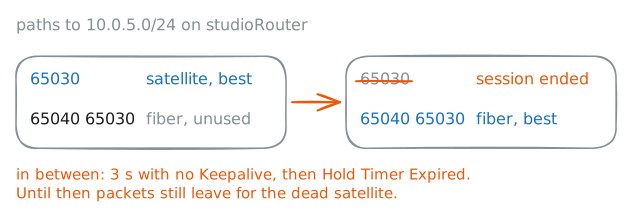
A session has to notice when the far end dies, and it can't rely on the network card, because a fault out on the path leaves the cards at both ends up. So each router sends a small Keepalive message on a steady beat, and each promises to give up on a neighbor that stays silent for the hold time. The two routers agree on that number in their Open messages, and these routers use a Keepalive every second and a hold time of 3 seconds.
Those are this lab's numbers, picked so you aren't left waiting. A common default is a Keepalive every 60 seconds and a hold time of 180.
The lab now cuts the satellite link somewhere over the ocean, and both cards stay up. It measures the traffic from
gameServertoplayerfor 12 seconds around the cut. The fiber path is still sitting in your table, unused.gameServer:~# ping -i 0.1 -c 120 -W 1 10.0.5.10 studioRouter:~# vtysh -c "show ip bgp neighbors 10.0.15.3" gameServer:~# ping -c 3 -W 2 10.0.5.10
-
Withdraw your own block
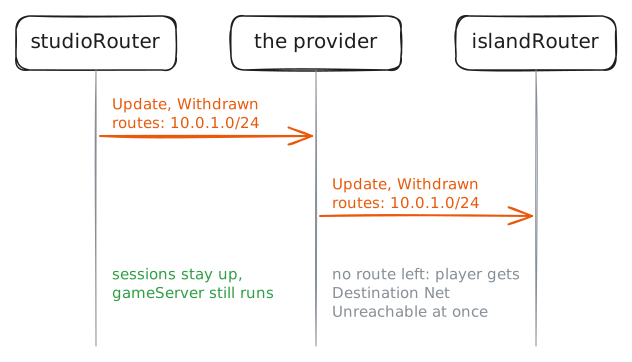
Silence is one way for a route to die, and the other is on purpose. A router that stops announcing a block sends an Update listing it as withdrawn, and each neighbor drops the route and passes the news on. The session stays up, and every router stays healthy.
On 4 October 2021, a maintenance command took down Facebook's backbone, the private network between its data centers. Its DNS servers, the machines that turn names into addresses, are built to stop announcing their own blocks when they lose touch with the data centers. So they did, and the rest of the internet removed the routes to them.
You'll do the same thing to your own network, with one command, and then put it back. The lab records on
fiberLinkas you withdraw.studioRouter:~# vtysh -c "configure terminal" -c "router bgp 65010" -c "address-family ipv4 unicast" -c "no network 10.0.1.0/24" islandRouter:~# vtysh -c "show ip bgp 10.0.1.0/24" player:~# ping -c 2 -W 2 10.0.1.10 gameServer:~# curl -sS -m 3 http://127.0.0.1/ studioRouter:~# vtysh -c "configure terminal" -c "router bgp 65010" -c "address-family ipv4 unicast" -c "network 10.0.1.0/24" player:~# curl -sS -m 3 http://10.0.1.10/
-
Claim someone else's block
Nothing you've typed proved that
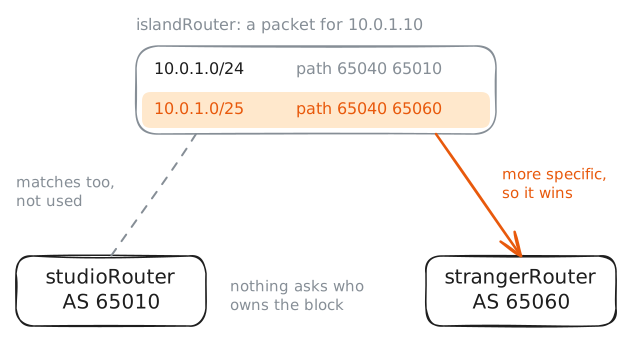
10.0.1.0/24is yours. The provider took your word for it, and BGP has no way to check.strangerRouteris another customer of the provider, in AS 65060, with a web server already running on it and no right to your addresses. You'll play the stranger for a moment: give that router the address10.0.1.10with a/25mask, which covers the lower half of your block, and announce10.0.1.0/25. On the island, your/24and the stranger's/25will both be two networks long.The address does two jobs: the web server will answer on it, and it gives the router a route to exactly
10.0.1.0/25, which FRR wants before it announces anything. One rule from every routing table matters here: with two routes that both match an address, the more specific one is used.strangerRouter:~# ip addr add 10.0.1.10/25 dev lo strangerRouter:~# vtysh -c "configure terminal" -c "router bgp 65060" -c "address-family ipv4 unicast" -c "network 10.0.1.0/25" player:~# curl -sS -m 3 http://10.0.1.10/ islandRouter:~# vtysh -c "show ip bgp 10.0.1.0/25" studioRouter:~# vtysh -c "show ip route 10.0.1.10" strangerRouter:~# vtysh -c "configure terminal" -c "router bgp 65060" -c "address-family ipv4 unicast" -c "no network 10.0.1.0/25" strangerRouter:~# ip addr del 10.0.1.10/25 dev lo player:~# curl -sS -m 3 http://10.0.1.10/
-
Remove one inside session
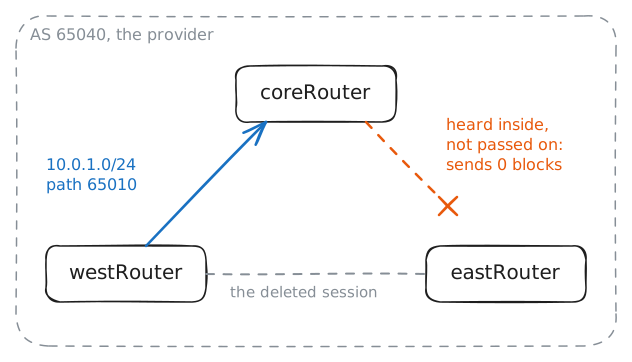
So far you've used BGP between networks, which is external BGP. The provider's three routers also talk BGP among themselves, called internal BGP, because each must carry what the others heard:
westRouterhears your block from you, andeastRouterhas to pass it to the island.Inside one network the AS path doesn't grow, because a number is added only where a route leaves a network. So the loop check from earlier has no number to find in here.
Each of the three holds a session with both of the others. An engineer at the provider proposes a tidy-up:
westRouterandeastRouterboth have a session withcoreRouter, so their direct session looks like a waste. Your game depends on that decision, so make the change as that engineer, onwestRouter.westRouter:~# vtysh -c "configure terminal" -c "router bgp 65040" -c "no neighbor 10.0.20.4" player:~# curl -sS -m 3 http://10.0.1.10/ coreRouter:~# vtysh -c "show ip bgp" coreRouter:~# vtysh -c "show ip bgp summary" coreRouter:~# vtysh -c "configure terminal" -c "router bgp 65040" -c "address-family ipv4 unicast" -c "neighbor 10.0.20.2 route-reflector-client" -c "neighbor 10.0.20.4 route-reflector-client" eastRouter:~# vtysh -c "show ip bgp 10.0.1.0/24" player:~# curl -sS -m 3 http://10.0.1.10/
Run these steps on real machines
Keep reading
- The Two-Napkin Protocol, the Computer History Museum on how BGP began article
- Understanding how Facebook disappeared from the Internet, Cloudflare's account of the 2021 outage article
- YouTube Hijacking: A RIPE NCC RIS case study, the 2008 incident minute by minute article
- What is BGP and BGP Configuration Explained, a CBT Nuggets MicroNugget video