 Hack the Route Start learning Open app
The idea
One router serves every shop in a mall, and the shops must never see each other. You split it into several routers that share one box, then open exactly the holes the shops need.
Steps
-
One router, every shop
You run the network at a shopping mall, and one
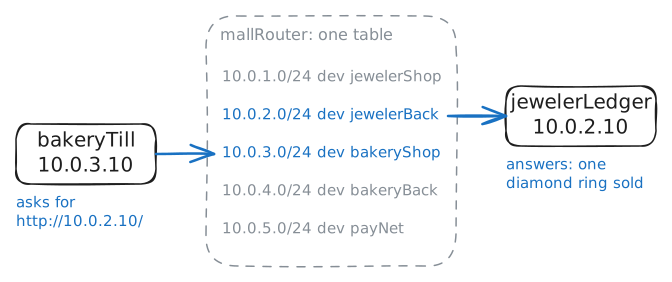
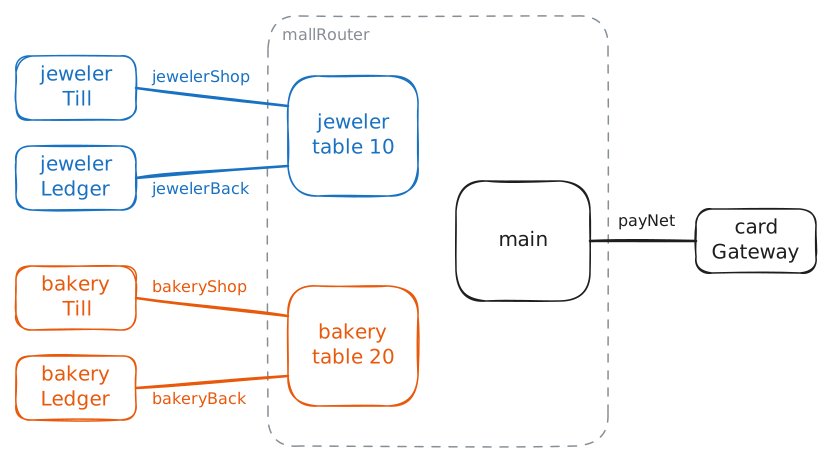
mallRouterin the basement serves every shop. The jeweler rents two networks from you:jewelerShop,10.0.1.0/24, wherejewelerTillrings up sales, andjewelerBack,10.0.2.0/24, wherejewelerLedgerkeeps the books. The bakery rents the same pair,bakeryShopon10.0.3.0/24andbakeryBackon10.0.4.0/24.cardGateway, onpayNet,10.0.5.0/24, approves card payments for everybody.mallRouterhas one network card on each of those five networks, named after the network, and in this lab "card" on its own always means that kind of card. A router adds a row to its routing table for each network on its cards, the moment a card gets an address, and then forwards packets between any two rows. That's its whole job, and it has no idea what a tenant is.You've set up nothing else on
mallRouter.jewelerLedgeris at10.0.2.10, and the bakery has no business reading it.mallRouter:~# ip route bakeryTill:~# curl -sS -m 3 http://10.0.2.10/
-
Split the router in two
A router per shop would work, and providers faced that same bill in the late 1990s: one router at the edge of their network, serving many customers who must never see each other. Their answer, written up in 1999 as RFC 2547, was to split the router instead of buying more, with a separate table for each customer site.
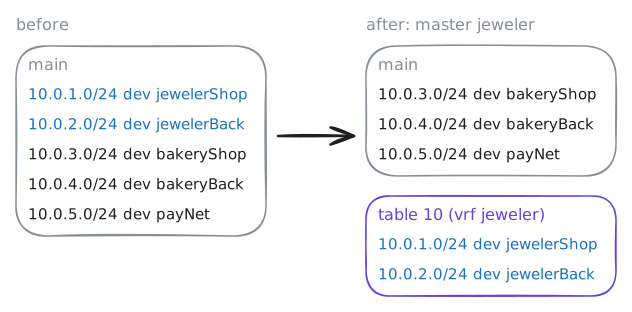
VRF, Virtual Routing and Forwarding, gives one router several routing tables, and each card belongs to exactly one of them. A packet is looked up in the table of the card it came in on, so two cards in different VRFs route as if they sat on two different routers, although they still share one firewall. A VLAN does the same thing one layer down, splitting a switch into several.
Linux builds this from a fake card.
ip link add jeweler type vrf table 10makes a card namedjeweler, connected to nothing, that stands for table 10, andip link set jewelerShop master jewelermoves a real card under it.masteris Linux's word for a card that owns other cards.You'll do this for the jeweler and then print the tables. Plain
ip routeprints the table you've been reading, whose name ismain.mallRouter:~# ip link add jeweler type vrf table 10 mallRouter:~# ip link set jeweler up mallRouter:~# ip link set jewelerShop master jeweler mallRouter:~# ip link set jewelerBack master jeweler mallRouter:~# ip route mallRouter:~# ip route show vrf jeweler bakeryTill:~# curl -sS -m 3 http://10.0.4.10/ bakeryTill:~# curl -sS -m 3 http://10.0.2.10/
-
Seal each table
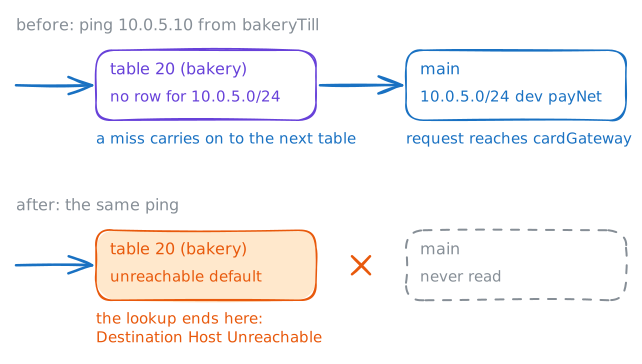
payNethasn't moved.cardGatewaybelongs to no shop, so the router'spayNetcard stays inmain, and the bakery's table has no row for10.0.5.0/24.A VRF's table isn't the only one the router can read. Linux keeps all its tables in one ordered list, with the VRF's table on it and
mainfurther down, so the question is what a lookup does when it finds nothing in the VRF's table.You'll ping
cardGatewayfrom the bakery's till while the lab records what reaches it, then read that list, and close any gap you find.bakeryTill:~# ping -c 2 -W 2 10.0.5.10 mallRouter:~# ip rule mallRouter:~# ip route get 10.0.5.10 vrf bakery mallRouter:~# ip route add unreachable default vrf bakery mallRouter:~# ip route add unreachable default vrf jeweler mallRouter:~# ip route show vrf bakery bakeryTill:~# ping -c 2 -W 2 10.0.5.10
-
Share one server
Card payments still have to work, so both shops need
cardGateway, and nothing else from outside their own tables. A sealed table closes everything, so you open one hole at a time, by hand, in each direction.Putting a row into a table that leads out of it is called route leaking. It's on purpose here, and it has nothing to do with the accident of the same name in BGP.
The way out is a row in the bakery's table:
ip route add 10.0.5.0/24 dev payNet vrf bakery, which says this block is behindpayNet, a card that isn't in this VRF. The way back is a row inmain:ip route add 10.0.3.0/24 dev bakery. Itsdevis the fake card, so a reply sent there is looked up in the bakery's table, which knowsbakeryShop.You'll add both rows for the bakery, and the jeweler's two get added for you. After that,
mainholds a route to both shops.mallRouter:~# ip route add 10.0.5.0/24 dev payNet vrf bakery mallRouter:~# ip route add 10.0.3.0/24 dev bakery bakeryTill:~# curl -sS -m 3 http://10.0.5.10/ jewelerTill:~# curl -sS -m 3 http://10.0.5.10/ mallRouter:~# ip route jewelerTill:~# ping -c 2 -W 2 10.0.3.10
-
Reuse the same numbers
The bakery has bought a new till system, and its vendor ships it on fixed addresses:
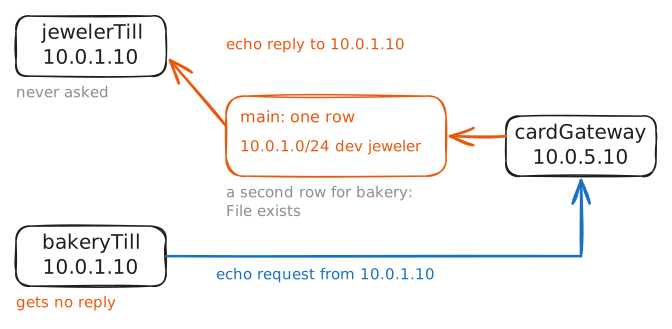
10.0.1.0/24for the shop and10.0.2.0/24for the back office. Those are the jeweler's numbers, and this happens all the time, because everyone numbers from the same private ranges. One company buys another, or two customers land on one router, and both have a10.0.1.0/24.On one routing table that can't work, because only one row for a block ever gets used, and it's the second reason VRFs exist. Each VRF is its own table, so the same block can sit in both.
The vendor has moved
bakeryTillto10.0.1.10andbakeryLedgerto10.0.2.10, the same two addresses the jeweler uses. You'll givemallRouterthe new numbers on the bakery's cards, and then fetchhttp://10.0.2.10/from both shops.cardGatewayis the catch. Its replies readmain, and both shops are now10.0.1.10. You'll try to add the bakery's way back too, and then pingcardGatewayfrombakeryTillwith a recording running.mallRouter:~# ip addr add 10.0.1.2/24 dev bakeryShop mallRouter:~# ip addr add 10.0.2.2/24 dev bakeryBack mallRouter:~# ip route show vrf bakery mallRouter:~# ip route show vrf jeweler bakeryTill:~# curl -sS -m 3 http://10.0.2.10/ jewelerTill:~# curl -sS -m 3 http://10.0.2.10/ mallRouter:~# ip route add 10.0.1.0/24 dev bakery bakeryTill:~# ping -c 2 -W 2 10.0.5.10
-
Translate at the border
cardGatewaycan't tell two shops apart while both call themselves10.0.1.10, so one of them needs a different name by the time it gets there. That's NAT: rewrite the source address on the way out, remember the change, and undo it on the reply.A rule on
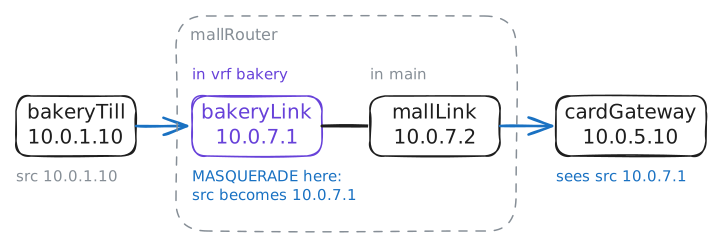
payNetwouldn't work, because the reply would get its address back inmain, andmain's one row for10.0.1.0/24still leads to the jeweler. On Linux the simplest place for NAT is a card that only the bakery's traffic crosses, so you'll build one: a veth pair, which is a virtual cable with a card at each end.ip link add bakeryLink type veth peer name mallLinkmakes both ends, and one end goes into the bakery's VRF while the other stays inmain.The two tables are now joined by a link, as two real routers would be, with a small block of its own,
10.0.7.0/30, that no shop uses.The bakery's route to
cardGatewaythen goes through the cable, and one rule translates everything leaving bybakeryLink.mallRouter:~# ip link add bakeryLink type veth peer name mallLink mallRouter:~# ip link set bakeryLink master bakery mallRouter:~# ip route replace 10.0.5.0/24 via 10.0.7.2 vrf bakery mallRouter:~# iptables -t nat -A POSTROUTING -o bakeryLink -j MASQUERADE bakeryTill:~# ping -c 2 -W 2 10.0.5.10 bakeryTill:~# curl -sS -m 3 http://10.0.5.10/ jewelerTill:~# curl -sS -m 3 http://10.0.5.10/
Run these steps on real machines
Keep reading
- Virtual Routing and Forwarding (VRF), the Linux kernel's own guide article
- What is Cisco VRF (Virtual Routing and Forwarding)? A short tour from CBT Nuggets article
- Reusing the same IP address on different interfaces, Red Hat's guide article
- NAT between identical networks using VRF, by Lars Kellogg-Stedman article