 Hack the Route Start learning Open app
The idea
Left alone, BGP takes the shortest path, even when that's your priciest link, and believes whatever it's told. You run a small provider here, so you write the rules it lacks: which way traffic flows, what a customer may send you, and who may claim a block of addresses.
Steps
-
Prefer the cheaper provider
You run Valley Net, a small company that brings the internet to one town.
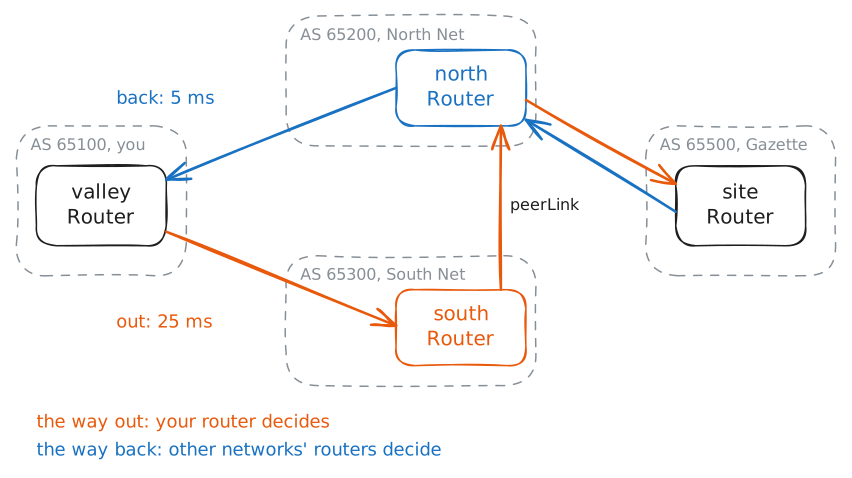
townUseris a subscriber on10.0.1.0/24, behind yourvalleyRouter, and the town's paper, the Valley Gazette, lives far away onnewsSite, at10.0.9.10.You buy your way to the rest of the internet from two providers. North Net's link is the premium one, at 5 ms each way with a bill to match, and South Net's link is cheap, at 25 ms each way. South Net reaches the Gazette through North Net, over
peerLink, so a packet sent that way crosses one more company, and nothing past those two links adds any delay worth counting.Each company is an autonomous system, or AS, known by a number: you're AS 65100, North Net is 65200, South Net is 65300, and the Gazette's host is 65500. BGP is how they tell each other which blocks of addresses they can reach, and every route arrives with an AS path, the list of networks it crossed.
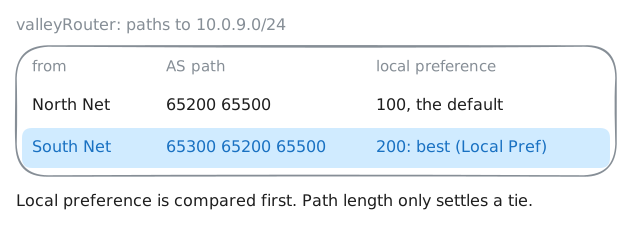
Left alone, BGP prefers the shortest list, because length is the one number it has for every route on earth. It knows nothing about your bill, so it picks North Net.
BGP's answer to that is policy: your own rules, applied to routes as they enter and leave your router. The protocol was built to leave this open, because every network has its own money and its own politics, and no standards body could write one rule for all of them.
In FRR, the routing software here, a rule lives in a route map: a numbered list of entries, each of which can test a route and change it. The plainest change is local preference, a number you attach to a route as it arrives. Higher wins, a route with none counts as 100, the usual default, and the router compares it before it looks at path length.
It's also private: your own routers share it, and no other network ever sees it.
You'll print both routes to the Gazette, ping it, give South Net's routes a local preference of 200, and ping again. The lab records that last ping's packets on
valleyRouter.valleyRouter:~# vtysh -c "show ip bgp 10.0.9.0/24" townUser:~# ping -c 3 -W 2 10.0.9.10 valleyRouter:~# vtysh -c "configure terminal" -c "route-map fromSouth permit 10" -c "set local-preference 200" valleyRouter:~# vtysh -c "configure terminal" -c "router bgp 65100" -c "address-family ipv4 unicast" -c "neighbor 10.0.13.3 route-map fromSouth in" valleyRouter:~# vtysh -c "show ip bgp 10.0.9.0/24" townUser:~# ping -c 3 -W 2 10.0.9.10
-
Pull traffic in differently
Replies still come home over North Net, and for a town that's most of the traffic, since subscribers download far more than they send. Local preference won't help, because the routers choosing the way in belong to other companies and never see it.
What you do control is what you tell them. Those routers compare paths by length, and every path to your block ends with your number, so adding your number to an announcement more than once makes it look longer. This is prepending, and it's the standard way to steer traffic you don't control.
It goes in a route map again, this time on what leaves for
northRouter.set as-path prepend 65100 65100adds your number twice, on top of the one BGP adds anyway, so North Net hears65100 65100 65100.northRouterknows two ways to10.0.1.0/24: straight from you overnorthLink, and fromsouthRouteroverpeerLink, with the path65300 65100.northRouter:~# vtysh -c "show ip bgp 10.0.1.0/24" valleyRouter:~# vtysh -c "configure terminal" -c "route-map toNorth permit 10" -c "set as-path prepend 65100 65100" valleyRouter:~# vtysh -c "configure terminal" -c "router bgp 65100" -c "address-family ipv4 unicast" -c "neighbor 10.0.12.3 route-map toNorth out" northRouter:~# vtysh -c "show ip bgp 10.0.1.0/24" siteRouter:~# vtysh -c "show ip bgp 10.0.1.0/24" townUser:~# ping -c 3 -W 2 10.0.9.10
-
Leave a note on a route
Your customer
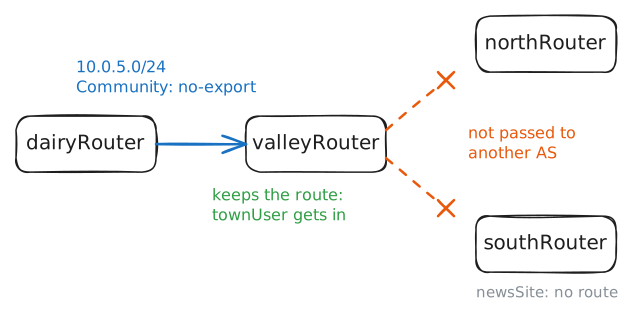
dairyRouter, AS 65400, is a dairy at the end of a radio link, 150 ms each way. Its office block,10.0.4.0/24, is already on the internet, and now it wants the barn cameras on10.0.5.0/24watched from town. Nobody beyond Valley Net needs a route to them.The dairy could phone you, and you could write a rule by hand, for this block and every block after it. BGP communities replace that phone call.
A community is a small tag attached to a route, and it travels with the route from router to router. By convention it's written
AS:number, and each network decides what its own numbers mean.A few have one meaning everywhere, and
no-exportis the best known: keep this route, and don't pass it to another AS. The dairy's route map has more to do than yours did, so read the two entries as a list that a route walks down until one fits.Entry 10 tests the route with
match ip address prefix-list cameras, which checks it against a named list of blocks, and it tags only the camera block. Entry 20 has no test, so every other route stops there and goes out unchanged.That second entry matters, because a route that fits no entry is dropped, as if every route map ended with one invisible
deny. Without entry 20 the office block would disappear from Valley Net.dairyRouter:~# vtysh -c "configure terminal" -c "ip prefix-list cameras permit 10.0.5.0/24" -c "route-map toValley permit 10" -c "match ip address prefix-list cameras" -c "set community no-export" -c "exit" -c "route-map toValley permit 20" dairyRouter:~# vtysh -c "configure terminal" -c "router bgp 65400" -c "address-family ipv4 unicast" -c "network 10.0.5.0/24" -c "neighbor 10.0.14.2 route-map toValley out" valleyRouter:~# vtysh -c "show ip bgp 10.0.5.0/24" northRouter:~# vtysh -c "show ip bgp 10.0.5.0/24" townUser:~# curl -sS -m 3 http://10.0.5.10/ newsSite:~# curl -sS -m 3 http://10.0.5.10/
-
Stop a customer's leak
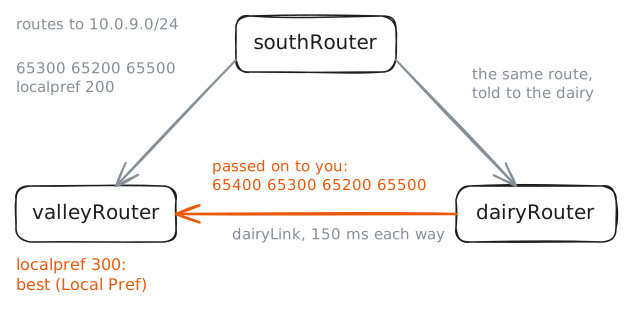
Providers rank routes by money. A route from a customer earns you money when traffic uses it, and a route from a provider costs you money, so the usual policy is customers first, whatever the path length. You'll write that rule for the dairy, with a local preference of 300.
Then the dairy buys a second link, from South Net, so that one failure can't take the farm offline. Having two providers is called multihoming, and it's common and sensible.
Here's what nobody at the dairy thought about.
toValleypasses everything it doesn't tag, and the new session has no route map at all. A BGP router with no filter tells each neighbor the best route it has to every block, so what the dairy hears from South Net, it'll offer to you, and what you tell it, it'll offer to South Net.A route leak is exactly this: a network passing routes from one provider or neighbor to another, offering to carry traffic it was never meant to carry. Nobody attacks anyone. A router does what it was left to do.
valleyRouter:~# vtysh -c "configure terminal" -c "route-map fromDairy permit 10" -c "set local-preference 300"
valleyRouter:~# vtysh -c "configure terminal" -c "router bgp 65100" -c "address-family ipv4 unicast" -c "neighbor 10.0.14.3 route-map fromDairy in"
dairyRouter:~# vtysh -c "configure terminal" -c "router bgp 65400" -c "neighbor 10.0.34.2 remote-as 65300"
valleyRouter:~# vtysh -c "show ip bgp 10.0.9.0/24"
townUser:~# ping -c 3 -W 2 10.0.9.10
valleyRouter:~# vtysh -c "configure terminal" -c "ip prefix-list dairyBlocks permit 10.0.4.0/24" -c "ip prefix-list dairyBlocks permit 10.0.5.0/24" -c "route-map fromDairy permit 10" -c "match ip address prefix-list dairyBlocks"
valleyRouter:~# vtysh -c "show ip bgp 10.0.9.0/24"
townUser:~# ping -c 3 -W 2 10.0.9.10
-
Check who owns a block
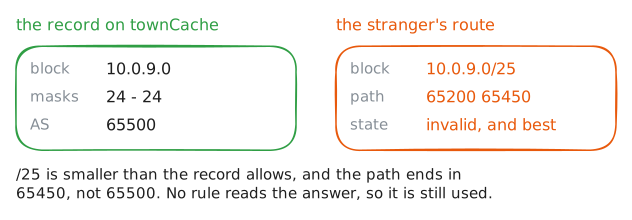
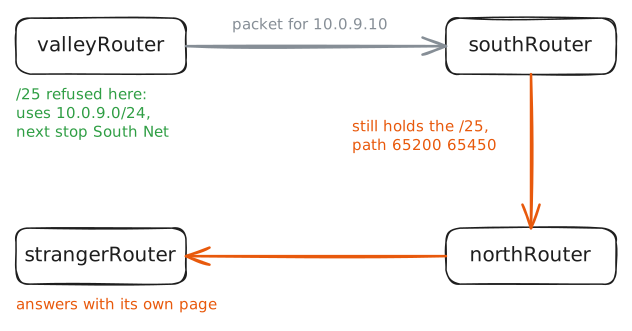
A leak is an accident: real routes, or an optimizer's copies of them, sent where they were never meant to go. In a hijack, a stranger announces a block that isn't theirs, and BGP has no field that says who owns what. A router always prefers the most specific route that fits, so a stranger announcing a smaller block wins everywhere the news spreads.
For most of BGP's life, the defenses were filters built from hand-kept lists, trust and a phone number. RPKI, the Resource Public Key Infrastructure, adds the missing fact from outside the protocol. The five regional registries that hand out addresses run it, and the holder of a block signs a Route Origin Authorization, or ROA, a record saying: this block, down to this size, may be announced by this AS.
Routers don't do the cryptography themselves. A separate program, a validator, downloads the records, checks them, and hands routers a plain list, and
townCacheplays that part for you. For each route, your router takes the origin, the last number in the path, and looks it up, with three possible answers: valid, invalid, or not found if no record covers that block.That's the
rpki validation-stateyou've been ignoring on every route, and you've written no rule that reads it.strangerRouter, AS 65450, is on North Net's network, and it's about to announce10.0.9.0/25, with its own copy of the Gazette's page behind it. You'll print your router's list first, and then the lab starts the hijack.valleyRouter:~# vtysh -c "show rpki prefix-table" valleyRouter:~# vtysh -c "show ip bgp 10.0.9.0/25" townUser:~# curl -sS -m 3 http://10.0.9.10/
-
Refuse invalid routes
The rule is short:
match rpki invalidin adenyentry. It goes in as entry 5, so it runs before anything else in the route map, and it needs to be on both providers' sessions, because the stranger's route reaches you over both.fromSouthalready exists, and entry 5 slots in ahead of its entry 10. North Net's session has no route map yet, sofromNorthis new, and it needs apermit 10after thedeny, or the invisible last entry would drop every route from North Net.valleyRouter:~# vtysh -c "configure terminal" -c "route-map fromSouth deny 5" -c "match rpki invalid" -c "exit" -c "route-map fromNorth deny 5" -c "match rpki invalid" -c "exit" -c "route-map fromNorth permit 10" valleyRouter:~# vtysh -c "configure terminal" -c "router bgp 65100" -c "address-family ipv4 unicast" -c "neighbor 10.0.12.3 route-map fromNorth in" valleyRouter:~# vtysh -c "show ip bgp 10.0.9.0/25" townUser:~# curl -sS -m 3 http://10.0.9.10/ southRouter:~# vtysh -c "show ip bgp 10.0.9.0/25" southRouter:~# vtysh -c "show ip bgp 10.0.9.0/25" townUser:~# curl -sS -m 3 http://10.0.9.10/
-
Refuse by default
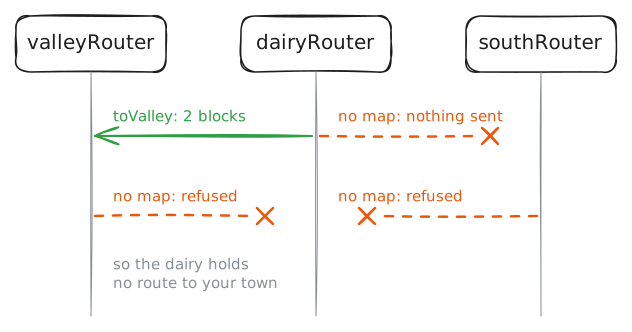
Your filter protects Valley Net from the dairy, and the dairy is still leaking your routes to South Net, along with its camera block, because
no-exportonly ever went on the session to you. You'll printsouthRouter's table first to see it. The real cause sits ondairyRouter: a BGP router that exchanges everything unless told otherwise.RFC 8212, one of the internet's standards documents, turned that around in 2017: a BGP router must not exchange routes with an outside neighbor until a policy says so. FRR follows it by default, under the setting
bgp ebgp-requires-policy, but the routers in this lab and thebgp-routinglab start with it off, so that sessions work without filters. You'll turn it back on for the dairy.FRR checks this setting on each route as it arrives or leaves, so routes already exchanged stay until the sessions restart. After that, each direction of each session needs a policy, such as a route map, or that direction carries nothing. The dairy has a route map on what it sends to you, and nothing else.
southRouter:~# vtysh -c "show ip bgp"
dairyRouter:~# vtysh -c "configure terminal" -c "router bgp 65400" -c "bgp ebgp-requires-policy"
dairyRouter:~# vtysh -c "clear ip bgp *"
dairyRouter:~# vtysh -c "show ip bgp summary"
valleyRouter:~# vtysh -c "show ip bgp 10.0.5.0/24"
townUser:~# curl -sS -m 3 http://10.0.5.10/
dairyRouter:~# vtysh -c "configure terminal" -c "ip prefix-list office permit 10.0.4.0/24" -c "route-map ownBlock permit 10" -c "match ip address prefix-list office" -c "exit" -c "route-map toValley permit 20" -c "match ip address prefix-list office" -c "exit" -c "route-map takeAll permit 10"
dairyRouter:~# vtysh -c "configure terminal" -c "router bgp 65400" -c "address-family ipv4 unicast" -c "neighbor 10.0.34.2 route-map ownBlock out" -c "neighbor 10.0.14.2 route-map takeAll in" -c "neighbor 10.0.34.2 route-map takeAll in"
dairyRouter:~# vtysh -c "show ip bgp summary"
southRouter:~# vtysh -c "show ip bgp"
townUser:~# curl -sS -m 3 http://10.0.5.10/
Run these steps on real machines
Keep reading
- How Verizon and a BGP Optimizer Knocked Large Parts of the Internet Offline Today, Cloudflare's account of the 2019 leak article
- RPKI: The required cryptographic upgrade to BGP routing, a readable tour from Cloudflare article
- BGP leaks and cryptocurrencies, Cloudflare on the 2018 hijack that sent a wallet site's visitors to a fake article
- Is BGP safe yet? A test of whether your own provider filters article