 Hack the Route Start learning Open app
The idea
Maya runs the routers of Lantern Freight from her desk. The head-office router, hq, takes requests from programs, and its warehouse network is out of reach. Use the router's REST API, JSON and tokens to fix that without logging in to hq.
Steps
-
Knock on the router's API
Maya looks after the routers of Lantern Freight, a delivery company. Changing a router used to mean logging in and typing commands, one router at a time. A program can do that too, but it has to read text meant for people.
So routers grew a second door, for programs: an API.
hqhas one, and it speaks HTTP like the web, encrypted here as HTTPS.Every thing the router knows has its own URL:
https://hq/api/routesis the list of its routes. A program sends a request there, and the router answers with data it can read without guessing.That's a REST API: things are URLs, and a few standard methods act on them. GET reads, POST creates, PUT replaces and DELETE removes, and
curlsends GET unless told otherwise.Ask
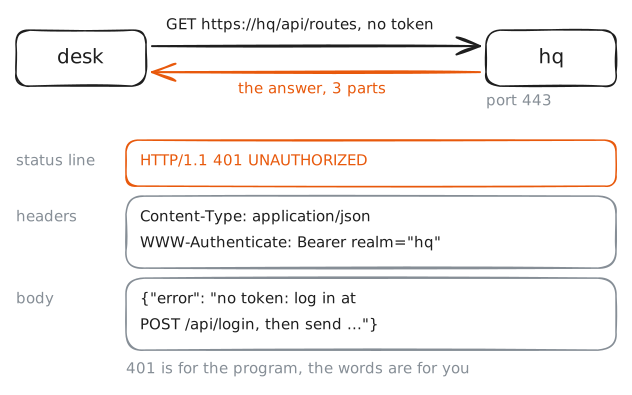
hqwhat its API offers, from Maya's machine,desk. Then ask for its routes, with-ito see the whole answer.desk:~# curl -s https://hq/api desk:~# curl -si https://hq/api/routes
-
Log in for a token
Sending a password with every request works, but then every program holds the password, and changing it breaks them all.
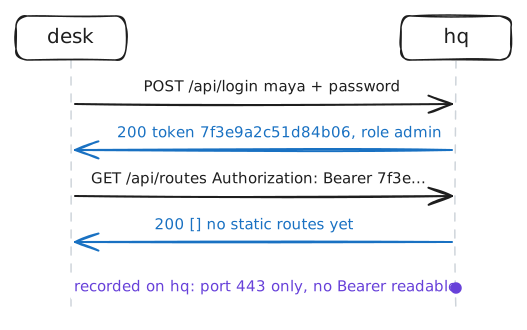
So most APIs swap the password for a token: you log in once, the API hands back a long random string, and each request after that carries it instead. A token can be taken away on its own, and opens only what its account may do. That's the bearer token the 401 asked for.
To log in, a program sends its username and password in JSON, the data format of nearly every API. Curly braces
{ }hold an object: names in double quotes, each with a value after a colon. Square brackets[ ]hold a list, also called an array.The login is a POST, the method for sending something new to the server. The HTTP client panel opens with it filled in. Send it, and find the
tokenin the answer.Then ask for the routes with the token in an
Authorizationheader, while the lab records onhq. The header holds a space, so it goes in quotes. Then ask for the cards.desk:~# curl -s https://hq/api/routes -H 'Authorization: Bearer 7f3e9a2c51d84b06' desk:~# curl -s https://hq/api/interfaces -H 'Authorization: Bearer 7f3e9a2c51d84b06'
-
Add a route with POST
The warehouse, the depot, has its own router,
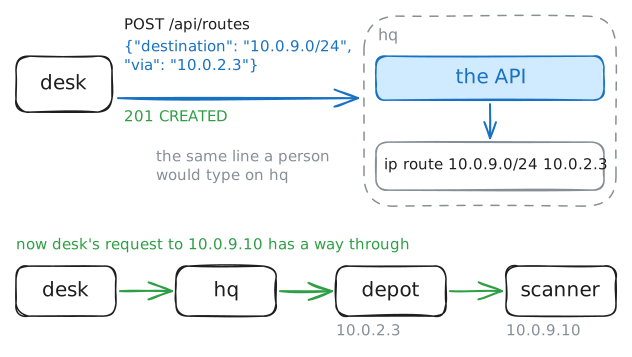
depot, at10.0.2.3on the link tohq. Behind it sits the network10.0.9.0/24, where the scanner server at10.0.9.10keeps track of every parcel. Try to reach the server fromdeskfirst.hqdoesn't know that network, so it can't pass anything on. It needs a static route: "for10.0.9.0/24, send packets to10.0.2.3". Typed athq's terminal, that's one line of config.Through the API, you create the route by sending it to the list: a POST to
/api/routes, with the route as a JSON object in the body."destination"is the network and"via"is the next router.Send the request from the panel, then fetch the server's page again. Last, look at
hqitself:vtyshis the router's own command shell, andshow ip route staticlists its static routes.desk:~# curl -sS -m 3 http://10.0.9.10/ desk:~# curl -sS -m 3 http://10.0.9.10/ hq:~# vtysh -c 'show ip route static'
-
When the API says no
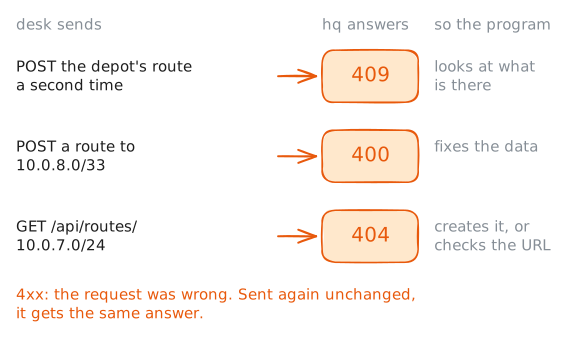
A program that talks to an API has to know when a request didn't work, and why. A person reads the words. A program checks the status code, so every API sorts its codes into families by the first digit:
- 2xx: it worked. 200 OK, 201 Created, 204 No Content.
- 4xx: the request was wrong, so the same request gets the same answer. Fix the request first.
- 5xx: the server failed. The same request might work later, if it's safe to send twice: that's the next step.
The 4xx codes are the ones you'll meet most, and each points at a different mistake. Try three of them.
Send the depot's route again, as if a script ran twice. Then, from the terminal this time, send a route with a typo in its mask,
/33: an IPv4 mask can't be longer than 32 bits. Then ask for a route that doesn't exist,10.0.7.0/24.desk:~# curl -si https://hq/api/routes -H 'Authorization: Bearer 7f3e9a2c51d84b06' -H 'Content-Type: application/json' -d '{"destination": "10.0.8.0/33", "via": "10.0.2.3"}' desk:~# curl -si https://hq/api/routes/10.0.7.0/24 -H 'Authorization: Bearer 7f3e9a2c51d84b06' -
PUT, DELETE and asking twice
Networks lose answers. A script sends a request, the connection drops, and the script can't tell whether the router got it. The safe move is to send it again, but only if sending twice does no harm.
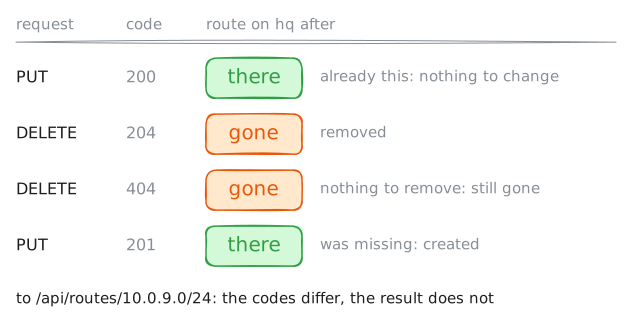
Some methods promise exactly that. A method is idempotent when doing it twice leaves the same result as doing it once:
- PUT sends the whole thing to its own URL: "the route at
/api/routes/10.0.9.0/24is this". Send it ten times and there's still one route, exactly as described. - DELETE removes the thing at a URL. The second time there's nothing left to remove, and the result is the same.
- POST isn't idempotent: it means "create one more", which is why the second one got 409.
PATCH changes some fields of a thing and leaves the rest alone. It's idempotent here too, though HTTP doesn't promise that for every PATCH.
Send the depot's route with PUT, to the route's own URL. Then delete it twice, and put it back with PUT.
desk:~# curl -si -X DELETE https://hq/api/routes/10.0.9.0/24 -H 'Authorization: Bearer 7f3e9a2c51d84b06'
desk:~# curl -si -X DELETE https://hq/api/routes/10.0.9.0/24 -H 'Authorization: Bearer 7f3e9a2c51d84b06'
- PUT sends the whole thing to its own URL: "the route at
-
A token that can only read
Maya's token may change routes. The company's dashboard, Grafana, also asks
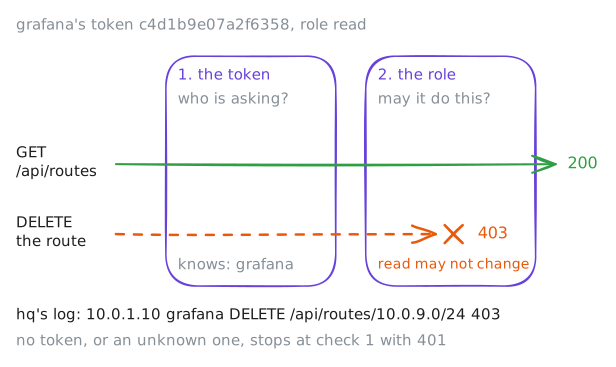
hqfor its routes every minute, to draw them. It only needs to read.If Grafana had Maya's token, anyone who broke into the dashboard could rewrite the company's routes. So Grafana has its own account,
grafana, with the roleread, and its own token,c4d1b9e07a2f6358. Giving each program only the rights it needs is called least privilege.That brings in a second refusal code. 401 means "I don't know who you are": no token, or one the server doesn't accept. 403 means "I know who you are, and you may not do this".
Proving who you are is authentication, and deciding what you may do is authorization.
Read the routes with Grafana's token, then try to delete the depot's route with it. Last, look at
hq's request log, which records every request with the account that sent it.desk:~# curl -s https://hq/api/routes -H 'Authorization: Bearer c4d1b9e07a2f6358' desk:~# curl -si -X DELETE https://hq/api/routes/10.0.9.0/24 -H 'Authorization: Bearer c4d1b9e07a2f6358' hq:~# tail -n 4 /var/log/api/requests.log
Run these steps on real machines