 Hack the Route Start learning Open app
The idea
Amara runs three ferry-harbour routers. Write down once what they should have, dry-run it, apply it twice, give one harbour a route of its own, and catch the change somebody typed by hand.
Steps
-
Three routers, one inventory
Amara looks after the network at Saltmarsh Ferries. Each of its three harbours has a router:
kelby,roskandtalham. Head office has put its bookings server on a new network,10.0.50.0/24, behind its own routercoreat10.0.1.5, and every harbour needs a route to it.By hand, that's three logins and a line each. But two more harbours open in spring, and typing the same thing into many routers is how routers that should match end up different.
So Amara uses Ansible: she writes down what the routers should have, and Ansible logs in to each over SSH and makes it so. That's configuration management. Her project lives in
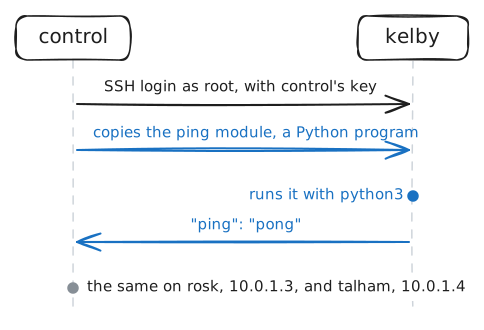
/root/harboursoncontrol, and it starts with the inventory,inventory.ini: the routers Ansible manages, in a group calledharbours.[harbours] kelby ansible_host=10.0.1.2 rosk ansible_host=10.0.1.3 talham ansible_host=10.0.1.4/etc/ansible/ansible.cfgpoints Ansible at this file. Ansible does its work through modules, andansible harbours -m pingruns the one calledpingon every router in the group.control:~# ansible harbours -m ping
-
Write it down, then dry-run it
On these routers FRR does the routing, and it reads its settings from
/etc/frr/frr.confwhen it starts. Today each router'sfrr.confis the one FRR saved when the router was set up by hand.Three files say what it should be.
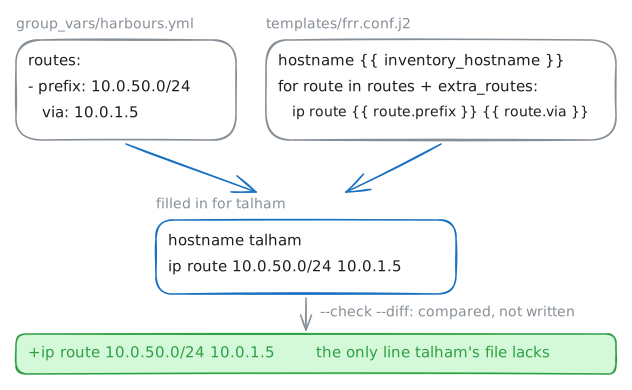
group_vars/harbours.ymlholds variables for every router in the group:routes: - prefix: 10.0.50.0/24 # head office: the bookings server via: 10.0.1.5 extra_routes: [] # empty for nowtemplates/frr.conf.j2is FRR's file with gaps in it, written in Jinja, Ansible's template language.{{ inventory_hostname }}becomes the router's name, and a loop writes one line per route:hostname {{ inventory_hostname }} ... {% for route in routes + extra_routes %} ip route {{ route.prefix }} {{ route.via }} {% endfor %}site.yml, the playbook, lists the tasks. Its first fills in the template for each router and writes the result to that router'sfrr.conf.Before it touches three routers, try it: with
--check, each task works out what it would change and stops there, and--diffprints the lines each file would gain or lose.control:~# ansible-playbook /root/harbours/site.yml --check --diff control:~# ansible talham -a "vtysh -c 'show ip route'"
-
Run it, then run it again
Writing the file isn't enough: FRR read
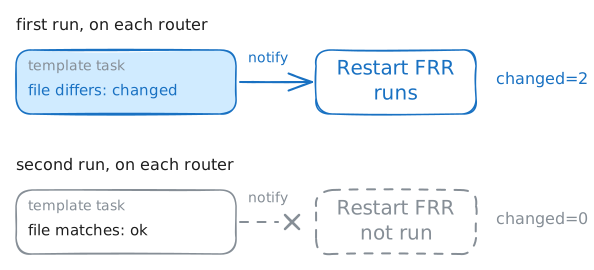
frr.confwhen it started, and doesn't read it again by itself. So the template task ends withnotify: Restart FRR, and the playbook has a handler by that name:handlers: - name: Restart FRR ansible.builtin.shell: | /usr/lib/frr/frrinit.sh restartA handler is a task that waits to be told. It runs once, at the end of the play, and only on a router where a task that notifies it reported a change. (The real one also waits for the routes to come back.)
A restart isn't free: the router drops its routes for a moment, and a router running OSPF or BGP drops its neighbours too. That's why it should happen only when something changed.
Run the playbook for real, then run it again straight away.
control:~# ansible-playbook /root/harbours/site.yml
control:~# ansible-playbook /root/harbours/site.yml
talham:~# curl -sS -m 3 http://10.0.50.10/
-
One harbour is different
Talham also ships freight, and the freight office's network,
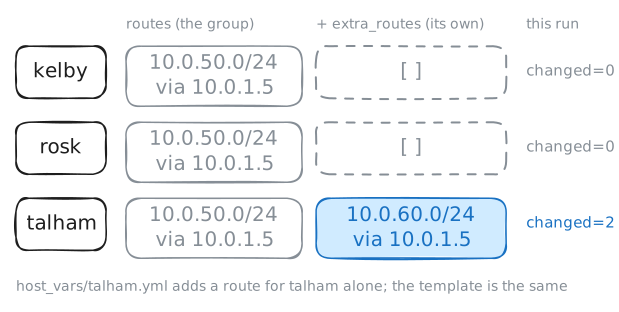
10.0.60.0/24, sits behindcoretoo. Onlytalhamneeds a route to it.Ansible's answer isn't a second playbook or a copy of the template. A file in
host_vars/named after a router holds variables for that router alone, and a value set there wins over the group's.It replaces the group's value whole, lists included: a
routes:list there would droptalham's route to bookings. That's why the template has a second list:extra_routes: []host_vars/talham.ymlalready holds it, empty. The template loops overroutes + extra_routes: the group's routes, then the router's own.Give
talhamthe freight route, written the way the route ingroup_vars/harbours.ymlis. YAML is fussy about indents: a-starts each route, with its keys lined up under it. -
A route typed by hand
On Thursday night the freight office couldn't reach Rosk. Jonas, on call, logged in to
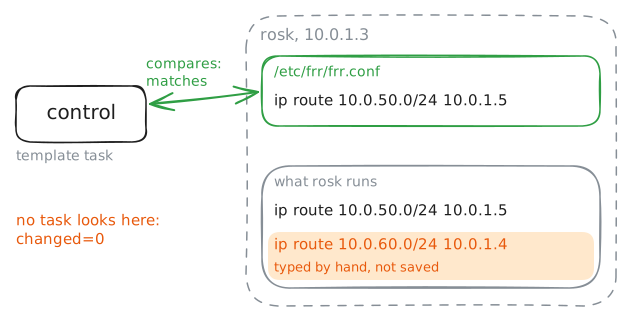
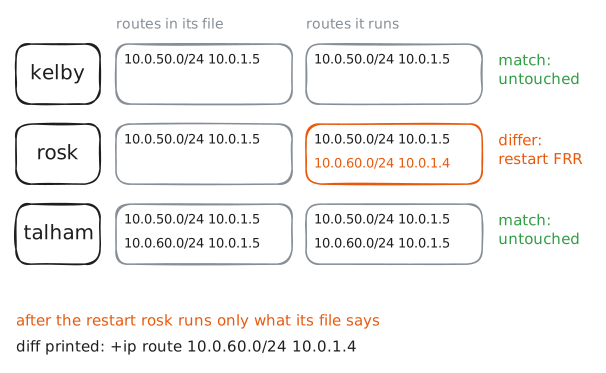
roskand typed a route by hand: freight's network throughtalham. It worked, he went back to bed, and he didn't save it or write it down.The project is supposed to say what every router runs. Run the playbook and see what it makes of
rosk. Then printrosk's routing table with a one-offansible -acommand.control:~# ansible-playbook /root/harbours/site.yml control:~# ansible rosk -a "vtysh -c 'show ip route'"
-
Compare the router, not only the file
The playbook has a second task, off until now:
- name: Compare the running routes with the file
  ansible.builtin.shell: |
    vtysh -c 'show running-config' | grep '^ip route' | sort > /tmp/running-routes
    grep '^ip route' /etc/frr/frr.conf | sort | diff -U0 - /tmp/running-routes ...
  register: routes_diff
  changed_when: routes_diff.rc == 1
  check_mode: false
  when: compare_running | bool
  notify: Restart FRR
It sorts the routes the router runs and the routes in its file, and
diffcompares the two lists:-for a route only the file has,+for one only the router runs.registerkeeps the result asroutes_diff, anddiffexits with 1 when the lists differ, whichchanged_whenturns into a change, which notifies the restart.check_mode: falselets it run even in a dry run, since it only reads. A third task prints the diff.whenskips all this while the group'scompare_runningsaysfalse. Set it totrueingroup_vars/harbours.yml.control:~# ansible rosk -a "vtysh -c 'show ip route'"
Run these steps on real machines