 Hack the Route Start learning Open app
The idea
Sanne's new Router has no routes to the branch libraries, and she won't type them: they're in a Terraform file. Plan, apply, run it again, and catch a change made by hand.
Steps
-
Routes, written down
Sanne looks after the network of Westvale Libraries: the central library, and branches at North, River and Harbour, each behind its own Router. Over the weekend, the old router at central was swapped for a new one,
central, and it came up this morning with no routes to the branches.Nobody at Westvale types routes into
central. They're written down in a file, and a tool puts them there: Terraform, the best-known tool for infrastructure as code.The file is
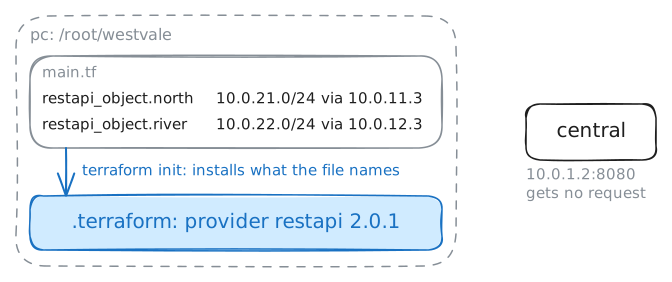
/root/westvale/main.tfon Sanne's machine,pc, in Terraform's own language, HCL. Terraform talks to devices through plugins called providers, and this file usesrestapi, which drives any REST API.centralserves a REST API on port 8080, with each static route at/v1/static-routes.Before Terraform can work in a folder,
terraform initsets it up.-chdirsays which folder.pc:~# cat /root/westvale/main.tf pc:~# terraform -chdir=/root/westvale init
-
A plan before anything changes
Before Terraform changes anything, it can say what it would change.
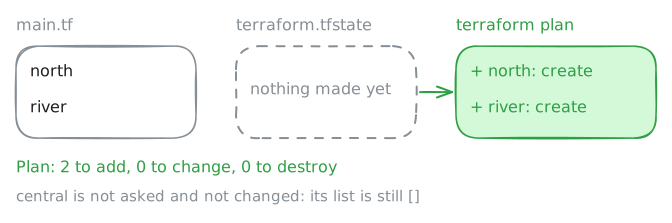
terraform plancompares the file with Terraform's state,terraform.tfstate: its record of every resource it has made.A resource in both is read back from its API, to see whether it still matches the file. A resource in the file but not in the state is one Terraform has never made, so it's to be created. Terraform doesn't go looking for it on the router.
planchanges nothing. It's the step a team reviews before anyone presses the button, and what a pipeline posts on a change request.Ask
central's API which static routes it has, then run the plan.pc:~# curl -s http://10.0.1.2:8080/v1/static-routes pc:~# terraform -chdir=/root/westvale plan
-
Apply
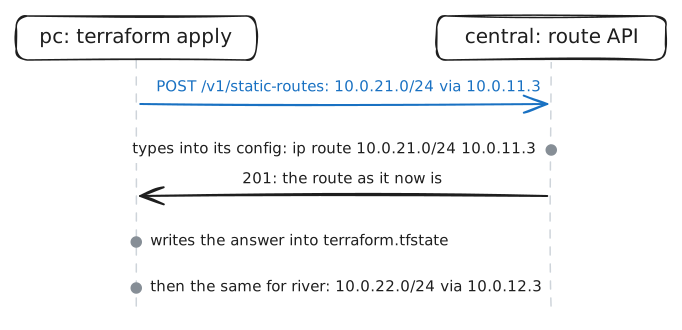
terraform applymakes the plan real. It plans again first, then asks for a yes, unless-auto-approvegives it up front.For each resource to create, the
restapiprovider sends aPOSTto/v1/static-routeswith the JSON from the file.central's API types the route into the router's config, and answers with the route as it now is. Terraform writes that answer into its state.Then Sanne asks North's catalogue server,
10.0.21.10, for its front page frompc. Until now,centralhad no idea where10.0.21.0/24was.pc:~# terraform -chdir=/root/westvale apply -auto-approve pc:~# curl -s http://10.0.1.2:8080/v1/static-routes pc:~# curl -sS -m 3 http://10.0.21.10/
-
Run it again
What happens if Sanne runs the same apply tomorrow, and the day after?
A script that typed
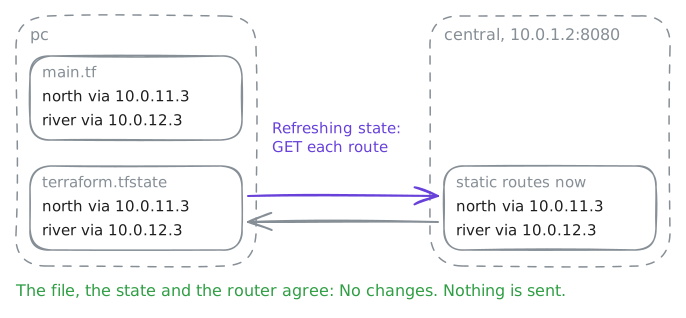
ip routelines would type them all again. FRR would shrug at routes it already has, but the script has two blind spots: it never takes away a route somebody removed from its list, and it never notices a route somebody changed by hand.Terraform doesn't replay anything. Each run compares the file, the state and what the API says now, and acts on the difference.
That's what makes Terraform idempotent, and what lets a team run it on a schedule, or on every change to the file, without fear.
Run the plan again, then list what's in the state with
terraform state list.pc:~# terraform -chdir=/root/westvale plan pc:~# terraform -chdir=/root/westvale state list
-
Changed by hand at the router
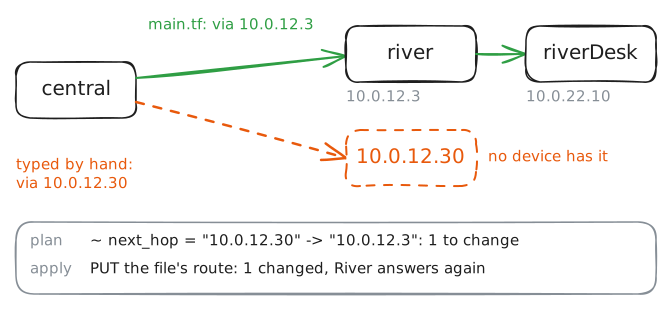
Tuesday night, River's catalogue went quiet, and Joris, on call, tried the oldest trick he knows: he deleted River's route on
centraland typed it again. He typed the next hop as10.0.12.30, not10.0.12.3, and it was late.That's drift: the router no longer matches the file, and the file is the record everyone trusts.
The lab makes his change now. Then Sanne tries River's catalogue server,
10.0.22.10, frompc, runs her plan, and applies it.pc:~# curl -sS -m 3 http://10.0.22.10/ pc:~# terraform -chdir=/root/westvale plan pc:~# terraform -chdir=/root/westvale apply -auto-approve pc:~# curl -sS -m 3 http://10.0.22.10/
-
Harbour opens Monday
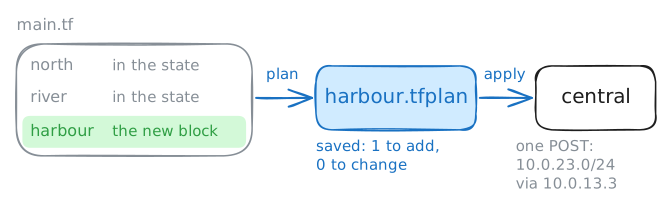
Harbour, Westvale's new branch, opens on Monday. Its router is cabled to
centralon its own link, where it answers on10.0.13.3, and Harbour's catalogue server is on10.0.23.0/24behind it.So
centralneeds one more route, and it gets it the same way as the others: a block in the file. Add arestapi_objectcalledharbourfor10.0.23.0/24with next hop10.0.13.3, in the same shape asnorthandriver.This time Sanne saves the plan with
-out=harbour.tfplan, the way her team does for a change someone reviews. Then she applies that file: exactly what the plan showed, with no new plan and no question. Last, she tries Harbour's catalogue server,10.0.23.10.pc:~# terraform -chdir=/root/westvale plan -out=harbour.tfplan pc:~# terraform -chdir=/root/westvale apply harbour.tfplan pc:~# curl -sS -m 3 http://10.0.23.10/
Run these steps on real machines