 Hack the Route Start learning Open app
The idea
Ines runs the network of Atlas Tea, with a Router in each of four branches. Tonight every branch needs a route to the new backup vault. Write it once in Python, run it against all four, and handle the router that doesn't answer.
Steps
-
One router, by hand and from Python
Atlas Tea imports tea and sells it from four branch shops: Oslo, Kyiv, Lima and Pune. Each branch has a router, and Ines looks after all four from her machine,
ops.A new backup vault opened at head office on
10.0.50.0/24, and each branch router needs a route to it. Ines added it onosloandlimaby hand. Two routers to go, and Atlas Tea is opening a fifth branch next month.Each router lets
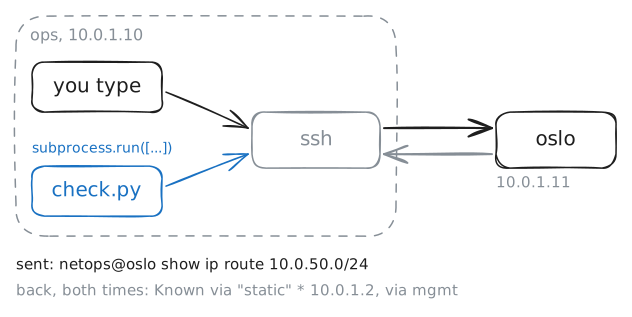
opslog in over SSH with a key, no password typed, and a login lands in the router's own command line, not a Linux shell. Sossh netops@oslo 'show ip route 10.0.50.0/24'runs that one router command and comes back.Python can run the same command. Here's
/root/check.py:for router in routers: answer = subprocess.run( ["ssh", "-o", "BatchMode=yes", f"netops@{router}", "show ip route 10.0.50.0/24"], capture_output=True, text=True, timeout=20, ) print(f"== {router}") print(answer.stdout)subprocess.runstarts a program from a list:ssh, then each word you'd type after it, with the quoted router command as one item.f"netops@{router}"is an f-string: Python puts the value ofrouterwhere the braces are.BatchMode=yestellssshnever to wait for a password, since a script has nobody to type one.capture_output=Truekeeps whatsshprints, andtext=Truehands it back as a string,answer.stdout.routerscomes from/root/routers.txt, which lists onlyoslofor now.ops:~# ssh netops@oslo 'show ip route 10.0.50.0/24' ops:~# python3 /root/check.py
-
The inventory: every router on the list
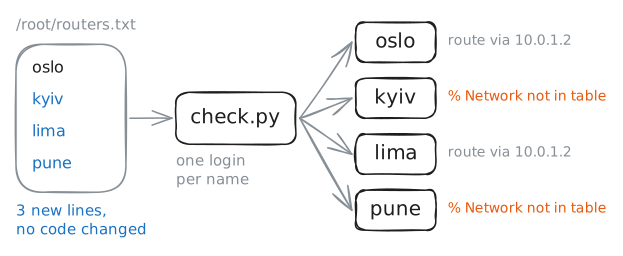
check.pydoesn't name any router. It reads them from/root/routers.txt, one per line:routers = open("/root/routers.txt").read().split().read()gives the whole file as one string, and.split()cuts it at every space and line break into a list:["oslo"]. Thenfor router in routers:runs the indented lines once for each name.A list of the devices a script works on is called an inventory. Keeping it apart from the code means adding the fifth branch next month is one new line in a text file, and no script changes. Every automation tool works this way, Ansible included.
Add the other three routers to the inventory:
kyiv,limaandpune, one per line. Saving runscheck.pyagain. -
JSON instead of screen text
To find the next hop in
* 10.0.1.2, via mgmt, weight 1, a script would have to cut the line apart: skip the star, stop at the comma. That breaks the day a new router version adds a word. Text like this is made for people.Most router commands can answer in JSON instead, with every value under a name. Add
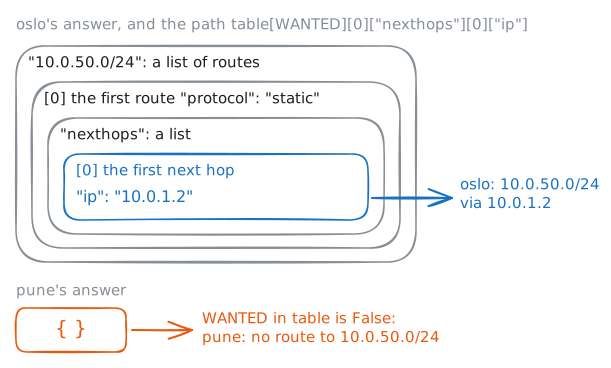
jsonto the end of the command and look. Spread out, with most fields left out, the answer is shaped like this:{ "10.0.50.0/24": [ { "protocol": "static", "nexthops": [ { "ip": "10.0.1.2", "interfaceName": "mgmt" } ] } ] }The network holds a list of routes, since one network can have several, and each route a list of next-hop addresses.
/root/audit.pyreads it, withWANTEDset to"10.0.50.0/24":table = json.loads(answer.stdout) if WANTED in table: hop = table[WANTED][0]["nexthops"][0]["ip"] print(f"{router}: {WANTED} via {hop}")json.loadsturns JSON text into Python: objects become dictionaries and lists become lists.WANTED in tableasks whether the dictionary has that name, and[0]picks a list's first item. So the path reads: the network, its first route, that route's first next hop, its"ip".Then run
audit.pyfor all four routers.ops:~# ssh netops@oslo 'show ip route 10.0.50.0/24 json' ops:~# python3 /root/audit.py
-
Push the route to every router
Time to fix
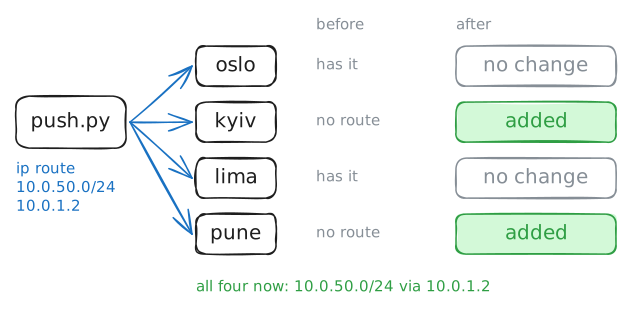
kyivandpune. Adding a route by hand takes three router commands:configure terminalopens config mode, where changes are typed, then the route, thenendto leave./root/push.pysends those three to every router on the inventory:ROUTE = "ip route 10.0.50.0/24 10.0.1.2" for router in routers: commands = f"configure terminal\n{ROUTE}\nend" subprocess.run( ["ssh", "-o", "BatchMode=yes", f"netops@{router}", commands], check=True, timeout=20, ) print(f"{router}: sent {ROUTE}")\nis a line break, so the three commands arrive one per line, and this router's command line runs them in turn, as if typed. Many vendors' routers take only one command per SSH request, which is why libraries like Netmiko keep a session open and type into it.check=Truemakes Python stop with an error ifsshreports a failure, so a refused command can't pass as done.It sends the route to all four routers,
osloandlimaincluded, which have it already. Run it, then runaudit.pyagain.ops:~# python3 /root/push.py ops:~# python3 /root/audit.py
-
When a router doesn't answer
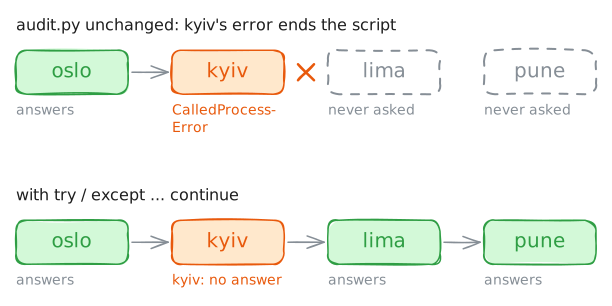
Networks fail in the middle of things. Kyiv's line to head office has gone down, and
kyivcan't be reached.Run
audit.pyagain and watch what one silent router does to the others. The inventory listsoslo,kyiv,lima,pune, in that order.Then make
audit.pycarry on past a router that doesn't answer. Python'stryandexceptcatch an error so the program can deal with it instead of stopping:try: answer = subprocess.run( ["ssh", "-o", "BatchMode=yes", f"netops@{router}", f"show ip route {WANTED} json"], capture_output=True, text=True, timeout=20, check=True, ) except subprocess.CalledProcessError as failure: print(f"{router}: no answer: {failure.stderr.strip()}") continueCalledProcessErroris the errorcheck=Trueraises whensshfails.failure.stderrholds whatsshsaid, andcontinuejumps to the next router. Put thesubprocess.run(...)call inside atrylike this one.ops:~# python3 /root/audit.py
-
Ask all four at once
Kyiv's line is back. Run
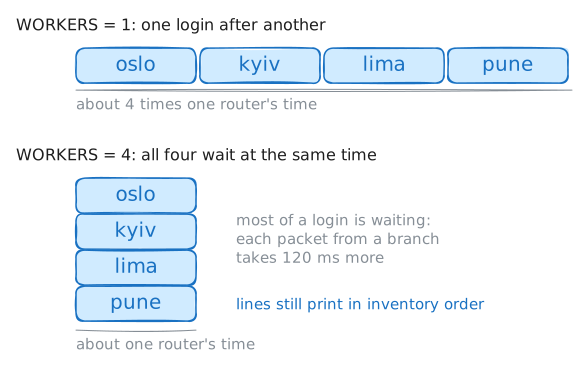
/root/fast.py: the same audit, timed. It prints how long the four routers took.Each SSH login spends most of its time waiting: for the network to carry each message to a branch far away and back, and for the router to answer. One router at a time, the waits add up.
fast.pyuses a pool of threads. A thread is one line of work inside a program, and several threads can wait at the same time:WORKERS = 1 with ThreadPoolExecutor(max_workers=WORKERS) as pool: for line in pool.map(ask, routers): print(line)ask(router)asks one router and returns one line.pool.map(ask, routers)hands each router toaskon one of the pool's threads, and gives back the results in inventory order. Withmax_workers=1there's one thread, so it's the plain loop again.Change
WORKERSto4, so each router gets a thread of its own. Saving runsfast.pyagain.ops:~# python3 /root/fast.py
Run these steps on real machines